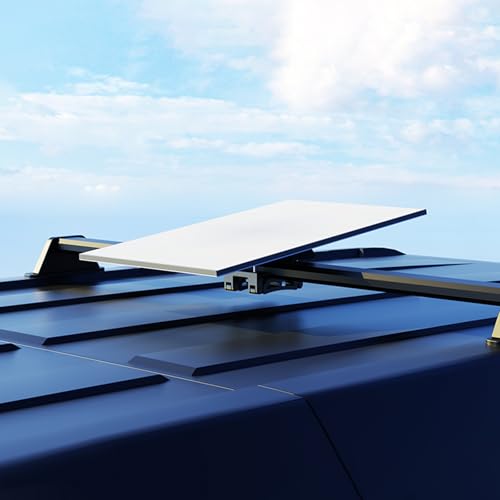
XLTTYWL Starlink Mount, Premium Starlink Standard Mobility Roof Bracket for Star Link Starlink Standard 4/4X/Gen 3 Flat Dishy Fits RV, Boat, Wood, Metal, Plastic or Slotted Vehicle Rails
Brand: XLTTYWL
Description
*High-Quality Aluminum Alloy Construction: Standard 4/4X/Gen 3 Starlink flat mount is made from lightweight yet robust aluminum alloy, providing enhanced durability and long-term performance.
*Weatheroof Design: Crafted from corrosion resistant materials, Standard 4/4X/Gen 3 starlink flat mount protects your starlink v4 system from rain, snow and other outdoor elements with a fully waterproof seal.
*Wide Application Scene: Standard 4/4X/Gen 3 Starlink Flat Mount can easily and securely attaches your Starlink Gen 3 dish to wood, fiberglass, metal, plastic surfaces or slotted vehicle roof racks with its durable stainless steel construction.
*Vehicle Roof Compatibilty: Features an 8° tilt angle to ensure optimal signal reception, maintaining reliable connectivity even in extreme and wet weather conditions. Includes an adapter kit to mount on standard crossbars for most vans and SUVs,RV, Wood, Metal, Plastic or Slotted Vehicle Rails, Stainless Steel Construction,allowing you to take high-speed Internet access with you on trips.
*One-Click Installation: XLTTYWL Standard 4/4X/Gen 3 rv mount can simple locking mechanism allows for quick and easy mounting of your Starlink standard gen 3 and enterprise(Starlink V4)dish without any tools for hassle-free setup nearly anywhere.
*High Compatibly: Standard 4/4X/Gen 3 RV Mount Compatible solely with the latest Starlink Standard Gen 3 and Starlink V4 Enterprise models round dish for reliable performance. - not compatible with earlier dish generations.
"SCREW INSTALLATION 1 | Download the Starlink App Scan the QR code to download the Starlink App 2 | Find Mounting Location Your Starlink needs a clear view of the sky so it can stay connected with satellites as they move overheard. Objects that obstruct the connection between your Starlink and the satellite will cause service interruptions. Use the obstructions tool in your App to ensure you have selected a suitable mounting location. You will also want to ensure your Starlink is mounted in the correct orientation relative to your vehicle as shown below. 3| Remove Kickstand Squeeze the release tab and pull it away from its fixed location. 4 | Mark the Pilot Holes Identify the installation location on your vehicle and mark the location of the 4 holes on your mobility mount using a pen or pencil. 5 | Drill the Pilot Holes Drill the holes with a 5 mm (3/16 in) drill bit. A mounting surface of at least 1.5mm thick is recommended. 6 | Screw Mount to Surface Install a washer on the end of each screw and secure the mount to surface. Using a 13mm (1/2 in) deep-welled socket is recommended. 7 | Route Cable Through Mobility Mount Route the Starlink cable through the opening in the mobility mount and out the front end. 8 | Plug in Cable and Install Starlink Plug the ethernet cable into your Starlink and ensure the ethernet cable is fully inserted. Slide your Starlink into the mount until it clicks into place. 9 | Secure Mount Using the screwdriver, drive in the two locking screws until hand tight. Removing Your Starlink If you need to remove your Starlink, back out the locking screws. Then push down on the release tab on the mount while pushing your Starlink away from you.
Sold by
Amazon Warehouse
Official Amazon outlet for open-box & returned items
- Backed by Amazon's A-to-Z Guarantee
- 30-day return policy
- Ships from Amazon fulfillment centers
- Price verified on Amazon
Product Details
- SKU:
- awhd-us-b0dnt7cl42
- Model:
- SK0092
- Country:
- US
- ASIN:
- B0DNT7CL42
Shopping Smarter
Common questions about buying open-box and refurbished.