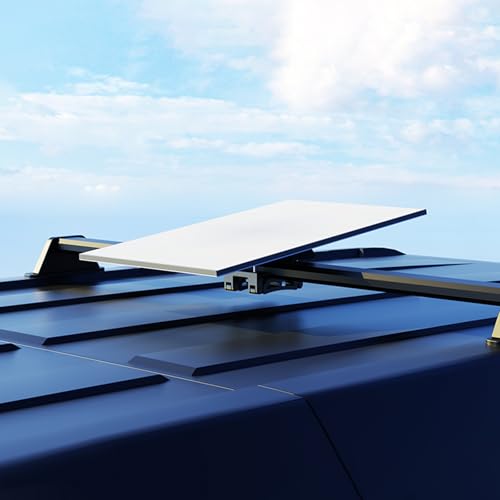
XLTTYWL Starlink Mini Mount, 0.47''-1.89'' Anti-Rust Mimi Starlinks Roof Rack Mount for Accessories Star Link Mini Dishy, Fits Star Link Mimi Standard Pole RV,Caravans,Van Mobility
Brand: XLTTYWL
Description
*Optimized for Starlink: XLTTYWL starlink mini roof mount is tailor-made for the miini starlink internet kit satellite, ensuring an exceptional user experience.
*Pole Compatibility: Mini Starlink roof rack mount mini is easily connects to roof racks with up 0.47 inches to 1.26 inches (12-32 mm) , 1.1 inches to 1.89 inches (28-48 mm)in diameter, allowing flexible relocation of your starlink mini accessories setup.(NOT INTENDED TO BE MOUNTED TO ROUND PROFILE BARS)
*Robust Stability Mini Accessories: With 2 enhanced screws from top-tier aluminum alloy materials, XLTTYWL starlink mini mounting kit undergoes rigorous testing, offering a secure installation with a remarkable 500-pound weight capacity, even in challenging weather.
*Easy Setup: Hassle-free installation with included hardware. Just slide the starlink mini mount car onto the pole, tighten the screws, and place your mini starlink device. (Note: mini starlink mount kit required not included).
*Sleek Aesthetic: Star link mini mount's pure gray high-quality metal material and simple design provide an aesthetically pleasing, high-end look that enhances the visual appeal of your installation for your mini starlink dishy.
"SCREW INSTALLATION 1 | Download the Starlink App Scan the QR code to download the Starlink App 2 | Find Mounting Location Your Starlink needs a clear view of the sky so it can stay connected with satellites as they move overheard. Objects that obstruct the connection between your Starlink and the satellite will cause service interruptions. Use the obstructions tool in your App to ensure you have selected a suitable mounting location. You will also want to ensure your Starlink is mounted in the correct orientation relative to your vehicle as shown below. 3| Remove Kickstand Squeeze the release tab and pull it away from its fixed location. 4 | Mark the Pilot Holes Identify the installation location on your vehicle and mark the location of the 4 holes on your mobility mount using a pen or pencil. 5 | Drill the Pilot Holes Drill the holes with a 5 mm (3/16 in) drill bit. A mounting surface of at least 1.5mm thick is recommended. 6 | Screw Mount to Surface Install a washer on the end of each screw and secure the mount to surface. Using a 13mm (1/2 in) deep-welled socket is recommended. 7 | Route Cable Through Mobility Mount Route the Starlink cable through the opening in the mobility mount and out the front end. 8 | Plug in Cable and Install Starlink Plug the ethernet cable into your Starlink and ensure the ethernet cable is fully inserted. Slide your Starlink into the mount until it clicks into place. 9 | Secure Mount Using the screwdriver, drive in the two locking screws until hand tight. Removing Your Starlink If you need to remove your Starlink, back out the locking screws. Then push down on the release tab on the mount while pushing your Starlink away from you.
Sold by
Amazon Warehouse
Official Amazon outlet for open-box & returned items
- Backed by Amazon's A-to-Z Guarantee
- 30-day return policy
- Ships from Amazon fulfillment centers
- Price verified on Amazon
Product Details
- SKU:
- awhd-us-b0dmvschcz
- Model:
- SK0096
- Country:
- US
- ASIN:
- B0DMVSCHCZ
Shopping Smarter
Common questions about buying open-box and refurbished.