Add to favorites
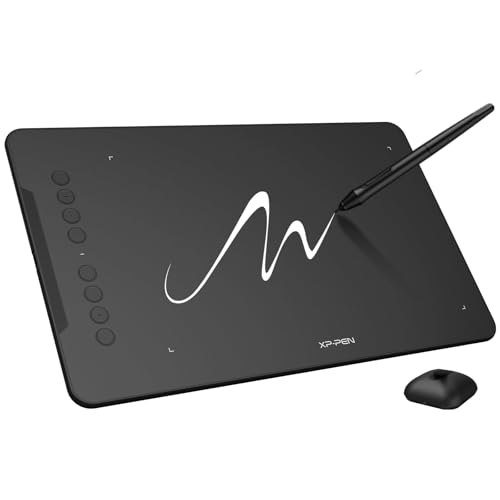
XPPen Updated Deco 01 V3 Drawing Tablet-16384 Levels of Pressure Battery-Free Stylus, 10x6 Inch OSU Graphic Tablet, 8 Hotkeys for Digital Art, Teaching, Gaming Drawing Pad for Chrome, PC, Mac, Android
Brand: XP-Pen
Condition: Used
$3994
$4499
-12% Save $505
Updated: 4 days ago
Description
Word-first 16K Pressure Levels: The upgraded stylus features 16,384 levels of pressure sensitivity and supports up to 60 degrees of tilt, delivering smoother lines and shading for a natural drawing experience. With no battery or charging needed, it operates like a real pen, making it easy for beginners to create effortlessly. This functionality helps novice artists develop their skills and explore their creativity without the intimidation of complex tools
Designed for Beginners: This drawing pad desinged with 8 customizable shortcuts for both right and left-hand users, express keys create a highly ergonomic and convenient work platform
Perfectly Adapted for Android: The XPPen Deco 01 V3 art tablet supports connections with Android devices running version 10.0 and above. It is recommended to download the XPPen Tools Android application, which adapts to your smartphone's screen aspect ratio, ensuring accurate mapping. It also supports mapping on Android screens with different aspect ratios in portrait mode
Large Drawing Space, Bigger Bold Inspiration: This expansive drawing pad has10 x 6.25-inch helps you break through the limit between shortcut keys and drawing area
Easy Connectivity for Beginners: The Deco 01 V3 offers USB-C to USB-C connectivity, plus adapters for USB C. This ensures easy connection to various devices, allowing beginner artists to set up quickly and focus on their creativity without compatibility concerns. Whether using a laptop, tablet, or desktop, the Deco 01 V3 provides a seamless experience, making it an ideal choice for those just starting their digital art journey
Lightweight and Portable: The Deco 01 V3 tablet is just 8 mm thin, making it lightweight and easy to carry. Perfect for beginners, it fits easily in your backpack, allowing you to practice drawing or note-taking wherever inspiration strikes. Its compact size encourages frequent use, helping you build your skills on the go
Digital Drawing Tablet: Strong Compatibility-The Deco 01 V3 is compatible with Windows 7 (or later), Android 10.0 or later), mac OS 10.13 (or later), Chrome OS 88 (or later) and Linux. Also compatible with many major designer software such as Photoshop, $Al, Painter, llustrator and Clip Studio, etc.*Please update your Windows to version 11 or Mac OS to version 12 first
Graphics Tablet: High Tech IC-We’ve adopted the newest High Tech IC, to make lines flow smoother and perform better. The Deco lights up on the ends of the drawing area, so you can create, even in the dark
What You Get: 1 x Deco 01 V3 Drawing Tablet, 1 x Stylus, 10 x Nibs, 1 x Stylus Stand, 1 x Glove, 1 x Protective Film, 1 x USB-C to USB-A Cable, 1 x USB to USB-C Adapter
1. Important Reminder
XP-PEN Deco01V2 drawing tablet must be connected to a Laptop/desktop/Chromebook to work, it's compatible with Windows 10/8/7(32/64bit), MAC OS 10.10 or above OS, Chrome OS 88.0.4324.109 and above OS.
2. Connection Tips
Your laptop/desktop needs to have USB-A port available for the connection. If your computer does not have USB-A port, then you need an extra converter for the connection, such as USB-C to USB-A etc. (Depends on what ports that your laptop/desktop has).
3. Install the XP-PEN Driver on Your Computer
1-Before Driver Installation: Please Remove Other Brand’s Driver from your computer and reboot before installing the XP-PEN’s driver, or there will driver conflict problems.
2-Driver Download: Our driver will be regularly updated, so please go to our official web to download the newest driver, and install it on your computer.
3-For Windows Users:Please close all drawing programs and run the XP-PEN driver as Administrator when installing. (IMPORTANT)
4. For Mac Mojave (10.14), Catalina (10.15) and above OS Users:
Mac Mojave (10.14) or above OS has upgraded in the security section, you need to put programs you newly downloaded into the accessibility list first to normally use it. Details steps please see the FAQ section on the XP-PEN web.
5. After-sale Service from XP-PEN
Please checks the Quick Guide, or search XP-PEN online to find a way to us for further assistance whenever you encounter problems with the use of the Deco01V2 graphics tablet, we are always standing by to help! XP-PEN provides a one-year warranty and lifetime tech support.
6. Programs
Please install a programs to your computer before your art creation/online teaching/remote work.
Free drawing programs like gimp, firealpaca, krita , medibang, etc.
Or register your xppen Deco01V2 graphics tablet on xp-pen web to apply for an ArtRage Lite, Explain Everything program.
XP-PEN Deco01V2 drawing tablet must be connected to a Laptop/desktop/Chromebook to work, it's compatible with Windows 10/8/7(32/64bit), MAC OS 10.10 or above OS, Chrome OS 88.0.4324.109 and above OS.
2. Connection Tips
Your laptop/desktop needs to have USB-A port available for the connection. If your computer does not have USB-A port, then you need an extra converter for the connection, such as USB-C to USB-A etc. (Depends on what ports that your laptop/desktop has).
3. Install the XP-PEN Driver on Your Computer
1-Before Driver Installation: Please Remove Other Brand’s Driver from your computer and reboot before installing the XP-PEN’s driver, or there will driver conflict problems.
2-Driver Download: Our driver will be regularly updated, so please go to our official web to download the newest driver, and install it on your computer.
3-For Windows Users:Please close all drawing programs and run the XP-PEN driver as Administrator when installing. (IMPORTANT)
4. For Mac Mojave (10.14), Catalina (10.15) and above OS Users:
Mac Mojave (10.14) or above OS has upgraded in the security section, you need to put programs you newly downloaded into the accessibility list first to normally use it. Details steps please see the FAQ section on the XP-PEN web.
5. After-sale Service from XP-PEN
Please checks the Quick Guide, or search XP-PEN online to find a way to us for further assistance whenever you encounter problems with the use of the Deco01V2 graphics tablet, we are always standing by to help! XP-PEN provides a one-year warranty and lifetime tech support.
6. Programs
Please install a programs to your computer before your art creation/online teaching/remote work.
Free drawing programs like gimp, firealpaca, krita , medibang, etc.
Or register your xppen Deco01V2 graphics tablet on xp-pen web to apply for an ArtRage Lite, Explain Everything program.
Sold by
Amazon Warehouse
Official Amazon outlet for open-box & returned items
- Backed by Amazon's A-to-Z Guarantee
- 30-day return policy
- Ships from Amazon fulfillment centers
- Price verified on Amazon
Product Details
- SKU:
- awhd-us-b077p6bqp7
- Model:
- Deco 01 V2
- Country:
- US
- ASIN:
- B077P6BQP7
- UPC:
- 761460825878
Shopping Smarter
Common questions about buying open-box and refurbished.
Why buy refurbished or open-box?
Refurbished and open-box products offer the same performance as new at a fraction of the price. You're already saving $5 on this listing. They've been inspected, tested, and are ready to use — the only difference is the price tag. Buying refurbished also reduces electronic waste, extending product life cycles and keeping functional devices out of landfills.
What's the difference between open-box and refurbished?
Open-box products are customer returns that have been inspected and confirmed functional. They may show little to no use — often the item was returned simply because the buyer changed their mind. Refurbished products have been professionally repaired or restored by technicians, tested to meet or exceed manufacturer specifications, and sometimes come with a warranty. Both are a smart alternative to buying new.
Why use OpenBoxFox?
Finding refurbished deals is time-consuming — you'd have to check Amazon Warehouse, Reebelo, Dyson Outlet, and others separately for XP-Pen products. OpenBoxFox aggregates these listings in one place, so you can compare and find the best deal without the legwork. We update pricing daily so you always see current availability and real savings.
Is it safe to buy refurbished?
Yes. Products listed on OpenBoxFox come from established retailers like Amazon, Reebelo, and Dyson — not unknown third-party sellers. Each retailer has buyer protection policies, return windows, and in some cases warranties. You get the price advantage of used goods with the purchase security of a known retailer.