Add to favorites
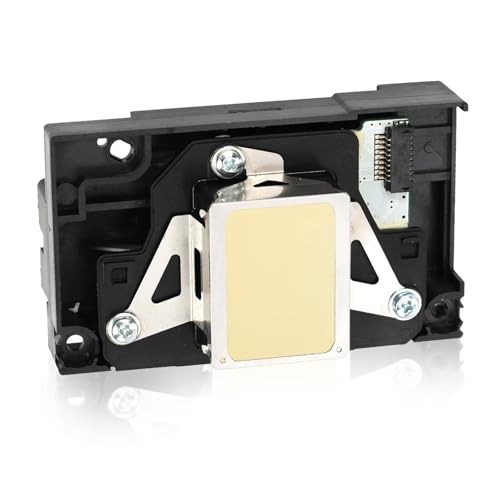
XINWEIUS Upgrade L1800 DTF Printhead,Includes A 9 Pin Printer Cable, Replacement for L1800 DTF Printer, L1800 L1800D R1390 R1400 R1430 R1500W R260 R270 R330 DTF Printer by XINWEIUS - Used condition

XINWEIUS Upgrade L1800 DTF Printhead,Includes A 9 Pin Printer Cable, Replacement for L1800 DTF Printer, L1800 L1800D R1390 R1400 R1430 R1500W R260 R270 R330 DTF Printer — Open-Box, 53% Off

Brand: XINWEIUS

Condition: Used - Mint
$10384
$21999
-53% Save $11615
Updated: 50 days ago

Description

Compatible Epson printer models: L Series: L1800, L1800D, 1500W Compatible with Epson Stylus Photo Series: 1390, 1400, 1410, 1430 Compatible with R Series: R260, R265, R270, R280, R330, R360, R380, R390 Compatible with Epson Stylus Photo: RX560, RX580, RX590 This printhead is compatible with the Epson L1800 and 1390 printers. It connects via a 9-pin cable. Incompatible With The Modified 13 Pin Print hHead Cable, If you have an unmodified L1800 or 1390 printer and need a standard replacement printhead, this is your best choice. Upgrade or replace your printhead with the L1800 Printhead, designed for high-quality printing with exceptional precision. This printhead ensures vibrant colours, sharp details, and consistent performance. Purchase Advice: Since DTF configurations often vary depending on third-party modifications, please carefully inspect the connector on your printhead before purchasing to ensure it is the 9-pin version. Replace the data cable when replacing the printhead to prevent short circuits. When replacing the FFC cable, check the pins for any ink leakage.For optimal performance, we recommend using high-quality CMYK inks and non-depositing white ink to ensure that the white channel flows smoothly and remains free of clogs. Installation Notes: Rinse thoroughly before use. Run 3–5 cleaning cycles. If the ink has not fully saturated the printhead, let it sit for several hours. When installing a new printhead, it is strongly recommended that you replace the printhead ribbon cable; using the old cable may cause a short circuit in the printhead. After replacement, be sure to prime the ink lines to remove any trapped air before attempting to print. Pre-installation Troubleshooting Recommendations: Before installing the print head, turn off the printer’s power. Failure to do so may result in the motherboard chip burning out. After installing the print head, print 10 sheets of A4 paper first to break in the new print head, and then load the ribbon. Please proceed with caution. If the original printhead is damaged—especially if there is ink leakage—the mainboard may already be burned out. Therefore, before replacing the printhead, please check the mainboard for any issues. If you are unfamiliar with this machine, we recommend that you take the printhead to a service center or have a professional replace the printhead. After-Sales Support: If you encounter any product issues, please contact us immediately for assistance. We have a professional team ready to assist you.

Frequently Asked Questions

Q1: Broken lines, horizontal streaks, or missing colors during printing? Cause: Clogged nozzles or air bubbles in the ink path. Solution: Go to Computer → Print Preferences → Maintenance → Nozzle Check. Clean 1–3 times after each check → Print a test page. If ineffective → Perform a deep clean (flush with a large amount of ink) once. If still clogged → Manually clean, soak, or replace the print head 

Q2: Completely blank page/no ink flowing out? Check: Ink chamber valve is open; ink level is sufficient; shipping lock (for new machines) is deactivated; ink tubes have no kinks or large air bubbles; print head’s FFC cable is securely inserted with no oxidation or damage. Action: Perform a deep clean → Remove air bubbles → Replace the cable → Replace the print head

 Q3: Color misalignment, color mixing, or ghosting? Causes: Calibration offset, clogging, ink issues. Solution: First, perform a nozzle check and cleaning. If normal → Calibrate the printhead (vertical/horizontal). Use unblended ink or stable ink to prevent ink mixing.

Q4: Still no improvement after multiple cleanings? Stop repeated cleaning (wastes ink/damages the printhead). Instructions: Soak in cleaning solution/gently flush with a needle (Proceed with caution) Still ineffective → Replace with a brand-new genuine print head (L1800-specific)

 Q5: How to extend service life and prevent clogs? Print at least one color page per week. Use genuine ink; do not mix different brands. For long-term use: Seal to prevent dust and maintain ink level ≥1/3. Shut down normally; in case of unexpected power outage, 

Q6: Error/print head recognition failure/red light flashing? Turn off the printer → unplug and reinsert the print head cable, clean the contacts (with isopropyl alcohol) → allow to air dry before reinstalling. If the printer still reports a print head or motherboard error → error → replace the print head

Sold by

Amazon Warehouse

Verified Retailer

Official Amazon outlet for open-box & returned items

  • Backed by Amazon's A-to-Z Guarantee
  • 30-day return policy
  • Ships from Amazon fulfillment centers
  • Price verified on Amazon

Product Details

SKU:
awhd-us-b0h1g5b91h
Model:
L1800
Country:
US
ASIN:
B0H1G5B91H
UPC:
789091103738

Shopping Smarter

Common questions about buying open-box and refurbished.

Why buy refurbished or open-box?
Refurbished and open-box products offer the same performance as new at a fraction of the price. You're already saving $116 on this listing. They've been inspected, tested, and are ready to use — the only difference is the price tag. Buying refurbished also reduces electronic waste, extending product life cycles and keeping functional devices out of landfills.
What's the difference between open-box and refurbished?
Open-box products are customer returns that have been inspected and confirmed functional. They may show little to no use — often the item was returned simply because the buyer changed their mind. Refurbished products have been professionally repaired or restored by technicians, tested to meet or exceed manufacturer specifications, and sometimes come with a warranty. Both are a smart alternative to buying new.
Why use OpenBoxFox?
Finding refurbished deals is time-consuming — you'd have to check Amazon Warehouse, Reebelo, Dyson Outlet, and others separately for XINWEIUS products. OpenBoxFox aggregates these listings in one place, so you can compare and find the best deal without the legwork. We update pricing daily so you always see current availability and real savings.
Is it safe to buy refurbished?
Yes. Products listed on OpenBoxFox come from established retailers like Amazon, Reebelo, and Dyson — not unknown third-party sellers. Each retailer has buyer protection policies, return windows, and in some cases warranties. You get the price advantage of used goods with the purchase security of a known retailer.

More open-box deals

Updated daily from Amazon, Reebelo, and Dyson.

Sign in to save items

Save favorites and get alerts when prices drop.

or

We'll email you a link to sign in instantly — no password needed.