Add to favorites
Vortex WiFi Extender, Vortex WiFi 6 Extender, WiFi Speed Increaser, Speedwave WiFi Extender 300Mbps, Wireless Signal Repeater Booster360° Full Coverage
Brand: Aimery
Condition: Used
$2091
$3998
-48% Save $1907
Updated: 3 days ago
Description
WiFi Extenders Signal Booster for Home : Wifi Extender wireless signal booster with lastest band technology can provide up to 300Mbps for 2.4GHz, maximizing reduces the loss of data transmission and enjoying HD video/game and fast speeds internet mode
Internet Extender WIFI Booster and Signal Amplifier:This WiFi repeater equipped with 2 high gain external antenna, covering up to 360 degrees, up to 2800 square feetIt allows you to receive stable WIFI signal in your Whole house
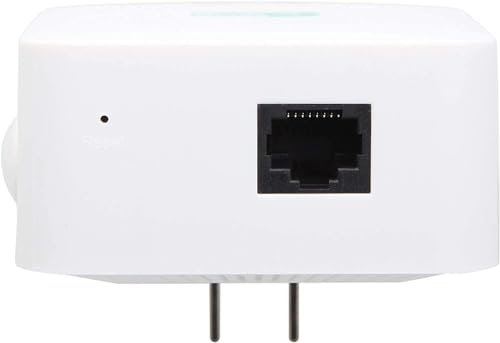
Repeater / AP Mode & Ethernet Port:Meet your different need in kinds of environment,The Ethernet ports is able to wired network be expanded into a wireless network and connect to any wired ethernet devices.Note:Password cant set special symbol
Universal Compatibility & Easy set up : This WiFi extender can be used with any 802.11b/g/n/a/ac wireless Internet router, what means it works with any standard router or gateway
Safe Network Access: This wifi extender can maximize the network security, ensure your network safety, prevent others stealing your net, protect your important data and avoid the interference and privacy problems of Wi-Fi
wifi booster Simple 3-step setup:
1. Plug the extender into a power outlet near the router. Wait for about 20 seconds until the repeater's on indicator light blinks slowly;
2. Go to your phone's WiFi connection page and select "wifi-XXX" to connect. (If you cannot find the name of the WIFI-XXX, it is recommended to turn on your phone's airplane mode and then turn off the airplane mode). ;
3. Connect to "wifi-XXX" and then jump directly to the browser page to set the WIFI information of the repeater, Login Password:admin,then connect your wifi router name and enter the password(Note:password cant used ""),set your extender SSID and password,note that the password of the repeater set inside needs to be the same as the WIFI password of the router!!! Click:start connect,wait 30-60s ,set successfully ,EXTENDER light on
Frequently asked questions
1、Q: Mobile phone settings or computer settings?
A: Mobile phone or computer can be set. Recommend cell phone setting, more convenient and fast.
2. Q: Can't find the wifi name of the repeater?
A:Press and hold the RESET button for 5 seconds on the side of the repeater using the card pin included in the box, then open the airplane mode on your phone and then close it, and search the network again.
3. Q: Why didn't it jump to the repeater setting page?
A: First, make sure the cell phone (or computer) is connected to the "wifi-XXX" WIFI, if it is not automatically jumped to the settings page, manually enter 192.168.11.1 to enter the settings.
4. Q: Why is there still no network for the repeater after the setup is completed?
A: Check whether the WIFI password set by the repeater is the same as the WIFI password of the superior router, this must be consistent.
1. Plug the extender into a power outlet near the router. Wait for about 20 seconds until the repeater's on indicator light blinks slowly;
2. Go to your phone's WiFi connection page and select "wifi-XXX" to connect. (If you cannot find the name of the WIFI-XXX, it is recommended to turn on your phone's airplane mode and then turn off the airplane mode). ;
3. Connect to "wifi-XXX" and then jump directly to the browser page to set the WIFI information of the repeater, Login Password:admin,then connect your wifi router name and enter the password(Note:password cant used ""),set your extender SSID and password,note that the password of the repeater set inside needs to be the same as the WIFI password of the router!!! Click:start connect,wait 30-60s ,set successfully ,EXTENDER light on
Frequently asked questions
1、Q: Mobile phone settings or computer settings?
A: Mobile phone or computer can be set. Recommend cell phone setting, more convenient and fast.
2. Q: Can't find the wifi name of the repeater?
A:Press and hold the RESET button for 5 seconds on the side of the repeater using the card pin included in the box, then open the airplane mode on your phone and then close it, and search the network again.
3. Q: Why didn't it jump to the repeater setting page?
A: First, make sure the cell phone (or computer) is connected to the "wifi-XXX" WIFI, if it is not automatically jumped to the settings page, manually enter 192.168.11.1 to enter the settings.
4. Q: Why is there still no network for the repeater after the setup is completed?
A: Check whether the WIFI password set by the repeater is the same as the WIFI password of the superior router, this must be consistent.
Sold by
Amazon Warehouse
Official Amazon outlet for open-box & returned items
- Backed by Amazon's A-to-Z Guarantee
- 30-day return policy
- Ships from Amazon fulfillment centers
- Price verified on Amazon
Product Details
- SKU:
- awhd-us-b0cnvvv937
- Model:
- WD-R611U
- Country:
- US
- ASIN:
- B0CNVVV937
- UPC:
- 703726407039
Shopping Smarter
Common questions about buying open-box and refurbished.
Why buy refurbished or open-box?
Refurbished and open-box products offer the same performance as new at a fraction of the price. You're already saving $19 on this listing. They've been inspected, tested, and are ready to use — the only difference is the price tag. Buying refurbished also reduces electronic waste, extending product life cycles and keeping functional devices out of landfills.
What's the difference between open-box and refurbished?
Open-box products are customer returns that have been inspected and confirmed functional. They may show little to no use — often the item was returned simply because the buyer changed their mind. Refurbished products have been professionally repaired or restored by technicians, tested to meet or exceed manufacturer specifications, and sometimes come with a warranty. Both are a smart alternative to buying new.
Why use OpenBoxFox?
Finding refurbished deals is time-consuming — you'd have to check Amazon Warehouse, Reebelo, Dyson Outlet, and others separately for Aimery products. OpenBoxFox aggregates these listings in one place, so you can compare and find the best deal without the legwork. We update pricing daily so you always see current availability and real savings.
Is it safe to buy refurbished?
Yes. Products listed on OpenBoxFox come from established retailers like Amazon, Reebelo, and Dyson — not unknown third-party sellers. Each retailer has buyer protection policies, return windows, and in some cases warranties. You get the price advantage of used goods with the purchase security of a known retailer.