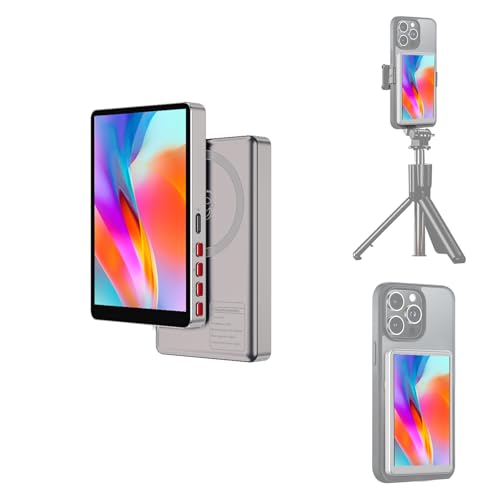
Vlog Selfie Monitor Screen iPhone, Back Camera Monitor iPhone, Gray — Open-Box, 23% Off
Brand: AOGELI
Description
Wireless Selfie Monitor Screen for iPhone & Android
Create better selfies, vlogs, tutorials, product videos, and live streams with a compact wireless selfie monitor screen designed for rear camera shooting. This back camera monitor helps you view yourself in real time while using your phone’s rear camera for clearer content.
Important Compatibility Notice
This selfie monitor screen is compatible with most iPhone and Android phones that support wireless screen mirroring or cast. It is not compatible with iPhone 17 series or Google Pixel devices. Please do not order this model if you are using an iPhone 17, iPhone 17 Plus, iPhone 17 Pro, iPhone 17 Pro Max, or any Google Pixel phone.
Designed for Rear Camera Selfie Shooting
This monitor does not switch between front and rear cameras. It mirrors your phone screen so you can open your phone camera app, select the rear camera, and frame yourself while recording selfies, vlogs, product demos, makeup videos, fitness clips, TikTok videos, YouTube videos, and live streams.
Wireless Screen Mirroring, No App Required for Regular Preview
No extra app is required for regular screen preview. Connect through your phone’s built-in Screen Mirroring function on iPhone or Cast / Screen Mirroring function on Android. The wireless screen mirroring name for this T1 model is “iScreen_p2p.” If a verification code is required during the first connection, enter “1234.”
Important iPhone 4K Recording Note
For smoother wireless mirroring on iPhone, 1080p recording is recommended when using the native iPhone camera app. If you need to record 4K video while using wireless mirroring, please use a third-party camera app such as Blackmagic Camera for better performance. If 4K recording appears delayed or choppy in the native iPhone camera app, it is usually related to iOS/native camera mirroring limitations, not a defect of the monitor.
No Built-In Speaker Notice
This selfie monitor screen is a visual preview monitor only. It does not have a built-in speaker and cannot play sound while recording. Audio recording, microphone input, and playback depend on your phone, camera app, microphone, headphones, or other connected audio devices.
How to Connect the Monitor
1. Turn on the monitor.
2. Open Screen Mirroring on iPhone, or Cast / Screen Mirroring on Android.
3. Select “iScreen_p2p” from the available device list.
4. Enter verification code “1234” if prompted.
5. Open your phone camera app and select the rear camera for selfie recording.
Bluetooth Remote Control
The included Bluetooth remote can take photos or start/stop video from up to 33 ft away in supported camera apps. Pair the remote with your phone through Bluetooth as “AB Shutter3.” The remote connection is separate from the monitor screen mirroring connection.
Magnetic Mounting
The magnetic mount attaches directly to bare iPhone 12, 13, 14, 15, and 16 series phones. For iPhone 11 and earlier models or Android phones, use the included magnetic metal ring. The monitor works best with bare phones or slim cases. Thick phone cases may reduce magnetic strength.
1800mAh Battery & Type-C Charging
The built-in 1800mAh rechargeable battery supports mobile filming and daily content creation. Charge with the included USB-C cable through a 5V/1A adapter, power bank, laptop, or car charger. For best performance, charge the device while it is powered off.
3 Brightness Levels & Display Modes
Choose Low, Medium, or High brightness depending on your shooting environment. Switch between full-screen and 1:1 display mode to match your filming needs. If the preview appears upside down, press the 180° rotation button to flip the image.
Wireless Charging Note
The magnetic mount may interfere with wireless charging. Please remove the monitor before wireless charging.
Package Includes
1 x Wireless Selfie Monitor Screen
1 x Bluetooth Remote Control
1 x Magnetic Metal Ring
1 x USB-C Charging Cable
1 x Velvet Pouch
Q1: Is this selfie monitor screen compatible with iPhone 17 series?
A: No. This wireless selfie monitor screen is not compatible with iPhone 17 series. Please do not order this model if you use an iPhone 17, iPhone 17 Plus, iPhone 17 Pro, or iPhone 17 Pro Max.
Q2: Does this back camera monitor work with Google Pixel phones?
A: No. This phone monitor screen is not compatible with Google Pixel devices.
Q3: What phones are compatible with this selfie monitor screen?
A: It works with most iPhone and Android phones that support wireless screen mirroring or cast. It is not compatible with iPhone 17 series or Google Pixel devices.
Q4: Does this monitor need an app?
A: No app is required for regular screen preview. Use Screen Mirroring on iPhone or Cast / Screen Mirroring on Android to connect.
Q5: What is the wireless connection name for this model?
A: The wireless screen mirroring name is “iScreen_p2p.” If a verification code is required during the first connection, enter “1234.”
Q6: Can I record 4K video with iPhone while using this monitor?
A: For smoother iPhone wireless mirroring, 1080p recording is recommended when using the native iPhone camera app. If you need 4K video recording while mirroring, use a third-party camera app such as Blackmagic Camera for better performance.
Q7: Why does 4K recording lag when I use the native iPhone camera app?
A: 4K lag during native iPhone camera mirroring is usually related to iOS/native camera mirroring limitations, not a defect of the monitor. For smoother 4K recording while mirroring, use a third-party camera app such as Blackmagic Camera.
Q8: Does this monitor have a built-in speaker?
A: No. This selfie monitor screen does not have a built-in speaker.
Q9: Can I play sound from this monitor while recording?
A: No. This monitor is a visual preview screen only and cannot play audio while recording. Audio recording and playback depend on your phone, app, microphone, headphones, or other connected audio devices.
Q10: Can this monitor switch my phone from front camera to back camera?
A: No. This monitor does not switch between front and rear cameras. It mirrors your phone screen so you can use your phone’s rear camera for selfies, vlogs, product videos, tutorials, and live streaming.
Q11: How do I use my rear camera for selfies with this monitor?
A: First connect the monitor through Screen Mirroring or Cast. Then open your phone camera app and select the rear camera. The monitor will show your phone screen so you can frame yourself while recording with the back camera.
Q12: Is this a good back camera monitor for iPhone vlogging?
A: Yes. It is designed for creators who want to use the iPhone rear camera for higher-quality selfies, vlogs, TikTok videos, YouTube videos, product demos, makeup videos, fitness clips, and live streaming.
Q13: Does it work for TikTok Live or YouTube videos?
A: Yes. This wireless selfie monitor screen can help you check framing while using your phone’s rear camera for TikTok, YouTube, live streaming, tutorials, and short-form video creation.
Q14: Why can’t I find the monitor when trying to connect?
A: Make sure the monitor is powered on and your phone’s Screen Mirroring or Cast function is open. Look for “iScreen_p2p” in the device list. If you still cannot connect, restart the monitor and phone, then try again.
Q15: Is the Bluetooth remote the same as the screen mirroring connection?
A: No. The monitor uses “iScreen_p2p” for wireless screen mirroring. The remote pairs separately through Bluetooth as “AB Shutter3.”
Q16: What does the Bluetooth remote do?
A: The included Bluetooth remote can take photos or start/stop video from up to 33 ft away in supported camera apps.
Q17: Does it attach magnetically to iPhone?
A: Yes. The magnetic mount attaches directly to bare iPhone 12, 13, 14, 15, and 16 series phones. For iPhone 11 and earlier models or Android phones, use the included magnetic metal ring.
Q18: Will it work with a phone case?
A: It works best with bare phones or slim cases. Thick phone cases may reduce magnetic strength, so we recommend using the included metal ring if the monitor does not hold securely.
Q19: Will the magnetic mount block my camera?
A: No. The slim magnetic design is made to avoid blocking the rear camera or sensors when attached correctly.
Q20: Can I use wireless charging while the monitor is attached?
A: We recommend removing the monitor before wireless charging. The magnetic mount may interfere with wireless charging.
Q21: How long does the battery last?
A: This monitor has a built-in 1800mAh rechargeable battery. Battery life may vary depending on brightness level, usage time, and connection conditions.
Q22: What is included in the package?
A: The package includes 1 wireless selfie monitor screen, 1 Bluetooth remote control, 1 magnetic metal ring, 1 USB-C charging cable, and 1 velvet pouch.
Q23: Why is the image upside down?
A: Press the 180° rotation button on the monitor to flip the image. You can also switch between full-screen mode and 1:1 display mode depending on your shooting needs.
Sold by
Amazon Warehouse
Official Amazon outlet for open-box & returned items
- Backed by Amazon's A-to-Z Guarantee
- 30-day return policy
- Ships from Amazon fulfillment centers
- Price verified on Amazon
Product Details
- SKU:
- awhd-us-b0h456rv96
- Model:
- T1
- Country:
- US
- ASIN:
- B0H456RV96
- UPC:
- 762744311612
Shopping Smarter
Common questions about buying open-box and refurbished.