Add to favorites
UGREEN 8K@60Hz Displayport KVM Switch 2 Monitors 2 Computers, Aluminum with 4 USB 3.0 Ports for 2 Computers Share Dual Monitors Keyboard Mouse Printer with 2 USB Cables/Power Adapter/Controller by UGREEN - Used condition

UGREEN 8K@60Hz Displayport KVM Switch 2 Monitors 2 Computers, Aluminum with 4 USB 3.0 Ports for 2 Computers Share Dual Monitors Keyboard Mouse Printer with 2 USB Cables/Power Adapter/Controller

Brand: UGREEN

Condition: Used
$7062
$8999
-22% Save $1937
Updated: 4 days ago

Description

Displayport KVM Switch 2 Monitors 2 Computers: This KVM switch allows you to easily manage and switch between two computers with just one set of keyboard and mouse while simultaneously controlling two monitors and sharing 4 USB 3.0 devices. Support extend mode and mirror mode. Plug & play without any software installation or driver. This dual monitor KVM switch is ideal for both professional and home office setups. (NOTE: This is a DisplayPort KVM switch, not an HDMI KVM switch.) Ultra HD 8K@60Hz Resolution: This DP 1.4 KVM switch displayport supports resolution up to 8K@60Hz and is backward compatible with 8K@30Hz, 4K@240Hz/144Hz/120Hz/60Hz/30Hz, 1080p and below. Providing clear picture quality images, and lag-free transmission. NOTE: If need to achieve 8K@60Hz resolution, your computers and monitor need to support 8K resolution, and you need to use standard 8K DP1.4 cable with a length of less than 2 meters to connect the device. (DP cables not included) With 4 USB 3.0 Ports: UGREEN KVM switches have 4 USB 3.0 ports (3 USB-A+1 USB-C) for sharing mouse, keyboard, USB flash drives, printer, hard drives, and other USB devices. USB 3.0 offers data transfer speeds of up to 5Gbps, which allows faster data transfer to make work more efficient. NOTE: It needs to be connected to a 12V/2A external power supply when using this switch Two Switching Modes: This monitor switch for 2 computers supports button switching and desktop controller switching, freely switching between 2 computers. With the desktop controller, you can place this displayport switcher outside your work area, making your desktop cleaner and tidier. NOTE: Not support Keyboard shortcuts (hotkeys) toggles Wide Compatibility: This KVM switch dual monitor supports Windows, MacOS, and Linux systems. DP KVM switch 2 computers 2 monitors supports connecting to a wide range of input devices including computers, laptops, MacBook Pro, etc. (NOTE: If your laptop only has USB-C ports, please use "a USB-C to USB-A OTG adapter + the included USB-A cable" to connect to the KVM switch's USB-A port.) PACKAGE LIST: 1*KVM switch, 2*USB A cables, 1* power adapters, 1*desktop controller, 1*user guide NOTE: 1, It does not support EDID emulation. 2, Please make sure each of your computers can support dual-screen displaying at the same time. 3, Please make sure your computer has 2 DP ports+1 USB-A port. 4, Each computer must connect 2 DP cables + 1 USB-A cable to ensure working properly. 5, The two monitors can only output the video source from one computer, and cannot output the signal source of PC1 and PC2 at the same time. 6, To ensure normal usage, please make sure to connect the power supply via the power adapter

This KVM switch allows you to easily manage and switch between two computers with just one set of keyboard and mouse while simultaneously controlling two monitors and sharing 4 USB 3.0 devices. Support extend mode and mirror mode. Plug & play without any software installation or driver. This dual monitor KVM switch is ideal for both professional and home office setups. (NOTE: This is a DisplayPort KVM switch, not an HDMI KVM switch.)

This DP 1.4 KVM switch displayport supports resolution up to 8K@60Hz and is backward compatible with 8K@30Hz, 4K@240Hz/144Hz/120Hz/60Hz/30Hz, 1080p and below. Providing clear picture quality images, and lag-free transmission. NOTE: If need to achieve 8K@60Hz resolution, your computers and monitor need to support 8K resolution, and you need to use standard 8K DP1.4 cable with a length of less than 2 meters to connect the device. (DP cables not included)

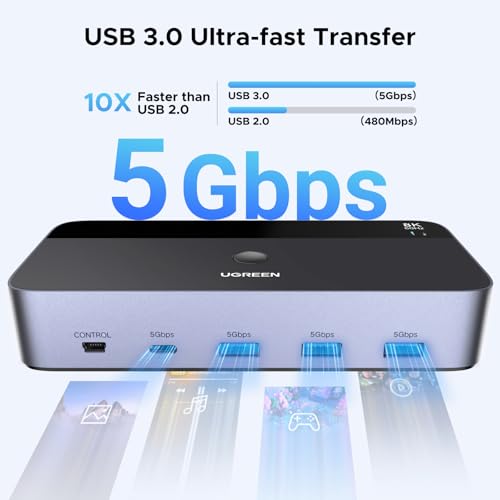
UGREEN KVM switches have 4 USB 3.0 ports (3 USB-A+1 USB-C) for sharing mouse, keyboard, USB flash drives, printer, hard drives, and other USB devices. USB 3.0 offers data transfer speeds of up to 5Gbps, which allows faster data transfer to make work more efficient.

This monitor switch for 2 computers supports button switching and desktop controller switching, freely switching between 2 computers. With the desktop controller, you can place this displayport switcher outside your work area, making your desktop cleaner and tidier. NOTE: Not support Keyboard shortcuts (hotkeys) toggles

This KVM switch dual monitor supports Windows, MacOS, and Linux systems. DP KVM switch 2 computers 2 monitors supports connecting to a wide range of input devices including computers, laptops, MacBook Pro, etc., and is widely used in offices, multimedia teaching, conference rooms, and other applications.

PACKAGE LIST: 1*KVM switch, 2*USB A cables, 3 different specifications of power adapters, 1*desktop controller, 1*user guide.

NOTE: 1, It does not support EDID emulation. 2, Please make sure each of your computers can support dual-screen displaying at the same time. 3, Please make sure your computer has 2 DP ports+1 USB-A port. 4, Each computer must connect 2 DP cables + 1 USB-A cable to ensure working properly. 5, The two monitors can only output the video source from one computer, and cannot output the signal source of PC1 and PC2 at the same time. 6, To ensure normal usage, please make sure to connect the power supply via the power adapter. 7, If your laptop only has USB-C ports, please use "a USB-C to USB-A OTG adapter + the included USB-A cable" to connect to the KVM switch's USB-A port.

Sold by

Amazon Warehouse

Verified Retailer

Official Amazon outlet for open-box & returned items

  • Backed by Amazon's A-to-Z Guarantee
  • 30-day return policy
  • Ships from Amazon fulfillment centers
  • Price verified on Amazon

Product Details

SKU:
awhd-us-b0dxf5z23s
Model:
55851
Country:
US
ASIN:
B0DXF5Z23S

Shopping Smarter

Common questions about buying open-box and refurbished.

Why buy refurbished or open-box?
Refurbished and open-box products offer the same performance as new at a fraction of the price. You're already saving $19 on this listing. They've been inspected, tested, and are ready to use — the only difference is the price tag. Buying refurbished also reduces electronic waste, extending product life cycles and keeping functional devices out of landfills.
What's the difference between open-box and refurbished?
Open-box products are customer returns that have been inspected and confirmed functional. They may show little to no use — often the item was returned simply because the buyer changed their mind. Refurbished products have been professionally repaired or restored by technicians, tested to meet or exceed manufacturer specifications, and sometimes come with a warranty. Both are a smart alternative to buying new.
Why use OpenBoxFox?
Finding refurbished deals is time-consuming — you'd have to check Amazon Warehouse, Reebelo, Dyson Outlet, and others separately for UGREEN products. OpenBoxFox aggregates these listings in one place, so you can compare and find the best deal without the legwork. We update pricing daily so you always see current availability and real savings.
Is it safe to buy refurbished?
Yes. Products listed on OpenBoxFox come from established retailers like Amazon, Reebelo, and Dyson — not unknown third-party sellers. Each retailer has buyer protection policies, return windows, and in some cases warranties. You get the price advantage of used goods with the purchase security of a known retailer.

Sign in to save items

Save favorites and get alerts when prices drop.

or

We'll email you a link to sign in instantly — no password needed.