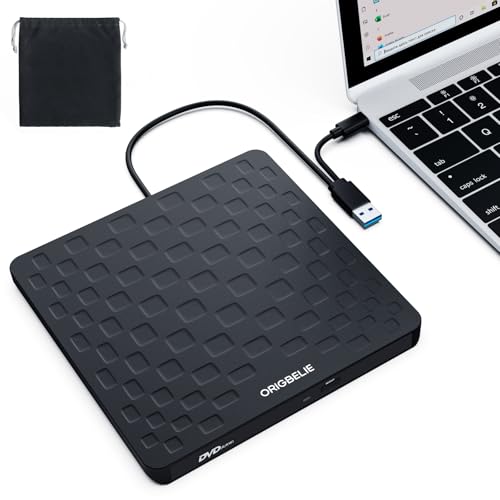
ORIGBELIE External CD DVD Drive for Laptop, USB 3.0 Type-C 13mm DVD Player — Open-Box, 33% Off
Brand: ORIGBELIE
Description
ORIGBELIE External CD Drive for Laptop
This multi-function 2 in 1 USB A/USB C CD burner for laptop that we launched is not only a CD/DVD reader, but also it has the function of CD/DVD burner.
This external CD & DVD drives can only start its job after it is connected to a laptop or a desktop, so it is not compatible with TVs, cars, trucks, projectors, tablets, iPads, phones, PS4/5, Xbox, Nintendo Switch, etc. In addition, it is compatible with Windows11/10/8/7/XP/Vista, Mac OS and Linux. Not compatible with Chrome OS and Blu-ray disc.
Product Specification
Model: external disc drive for laptop
Color: Black
Weight: 206.8g/0.46lb
Size: 148*147*13mm/5.83*5.79*0.51in
Power Supply: DC 5V/2A
Transport Interface: Built-in 2 in 1 USB 3.0 Type-A & Type-C data cable (on the back of the CD/DVD drive)
Supplementary Power Supply Interface: DC port * 1
Supplementary Power Supply Cable: USB A to DC Power Supply Cable*1 (included in the package)
Supported Disc Types: CD-ROM, CD-R, CD±RW, DVD-ROM, DVD-RAM, DVD±R, DVD±RW, DVD±R DL, VCD and SVCD
Compatible Operating System: Windows 11/10/8/7/XP, Windows Vista7/8, Mac OS, Linux
Compatible Devices: MacBook, Mac, iMac, laptop, desktop, PC and notebook computers (including Apple MacBook, MacBook Air, MacBook Pro, iMac, Mac, Mac mini, Mac Studio, Mac Pro)
Computer Output for CD/DVD Drive: 3-5V / 1.3-2A, power below this may cause recognition failure or read failure. At this time, you need to use the supplementary power supply cable to connect a 5V charger/power bank supply to supplement the power supply to the optical drive.
Package Included
External CD/DVD Drive * 1
User Manual * 1
USB A to DC Power Supply Cable * 1
Storage Bag * 1
Some things to note about this CD reader for laptop
1.The CD reader should be connected with USB port on laptop rather than connect with USB HUB. In addition, please connect the item with USB port behind of computer host if you use a desktop.
2.Make sure the CD/DVD driver of your computer is intact before using an external DVD player for laptop. The computer operating system comes with a CD/DVD driver. If the program is damaged or removed, the CD/DVD driver needs to be updated or reinstalled.
3.Setting the DVD Region to United States on the "DVD RW Drive" - Properties - click Hardware Tab - click Properties button - then choose country Region (US is 1) and click OK to apply. Note: You are only allowed to change the region code 4-5 times.
4.It's better to use the 5V charger/power bank to increase the power if your devices don't have enough power to support the CD drive external USB.
5.Insert the USB CD/DVD external drive into the computer. After the Windows system recognizes the optical drive, the "DVD RW Drive" icon will be displayed. The Mac OS computer will not display the device icon until the disc is placed in the optical drive and the disc is read successfully.
7.WINDOWS 11 needs a media player (such as VLC ) and a network connection.
8.Computers often do not natively support DVD movie playing, so a third-party media player (such as VLC) must be downloaded and installed to watch DVDs using this CD/DVD player. You can download and install a playing/burning software you like. You can also refer to the following software:
DVD player software: Any Media Player, Any DVD
Burning software for Windows operating systems: InfraRecorder, Ones, Express Disc Burner
Burning software for Mac OS: Burn for mac
Burning software for Linux OS/Unix OS: K3b (KDE Burn Baby Burn)
9.Because the video formats of most computers and mobile phones are not compatible with DVD, you need third-party software to convert the file format to a format that can be displayed on the disc, otherwise, even if you burn the file to a disc, it will not work.
10.The Mac OS system comes with a burning function:
Connect the optical drive and put the disc into it - click "File" on the top menu bar - click on the new "Burn Folder" - drag the files to be burned into the "Burn Folder" - click "Burn to Disc" - and then You can eject the disc. But one thing to note is that Mac OS computers can only burn blank discs, and a disc can only be burned once.
11.For the Mac OS, you need to eject the disc through the Mac OS command. At this time, pressing the eject key of the external DVD drive for PC will not work.
Sold by
Amazon Warehouse
Official Amazon outlet for open-box & returned items
- Backed by Amazon's A-to-Z Guarantee
- 30-day return policy
- Ships from Amazon fulfillment centers
- Price verified on Amazon
Product Details
- SKU:
- awhd-us-b0dp2lv27p
- Model:
- TP520
- Country:
- US
- ASIN:
- B0DP2LV27P
Shopping Smarter
Common questions about buying open-box and refurbished.


