Add to favorites

Nillkin Rugged Detachable Keyboard Case for iPad Air 13" & Pro 12.9", Black — Open-Box
Brand: Nillkin
Condition: Used
$7789
Updated: 2 days ago
Description
MILITARY-GRADE PROTECTION — YOUR iPad WALKS AWAY — We dropped this case. Off desks. Out of backpacks onto concrete. Off a workbench at a job site. 1.2-meter drop tested and it keeps going. The corner air-cushion bumpers take the hit before your screen knows what happened. A heavy-duty TPU frame and reinforced polycarbonate back wrap your iPad in protection that actually earns the word "rugged." Stain-resistant faux leather wipes clean after the job — mud, grease, coffee, gone. The sliding camera cover slides open when you need it and stays shut when you don't, keeping your lens protected and your privacy intact.
PRECISION FIT — CHECK YOUR MODEL IN SECONDS — Compatible with iPad Air 13-inch M4 2026 (A3461/A3462/A3464), M3 2025 (A3268/A3269/A3271), M2 2024 (A2898/A2899/A2900) and iPad Pro 12.9-inch 6th Gen 2022 (A2436/A2437/A2764/A2766), 5th Gen 2021 (A2378/A2379/A2461/A2462), 4th Gen 2020 (A2069/A2229/A2232/A2233), 3rd Gen 2018 (A1876/A1895/A1983/A2014). NOT compatible with iPad Pro 13-inch. Find your model in Settings > General > About, then tap Model Number.
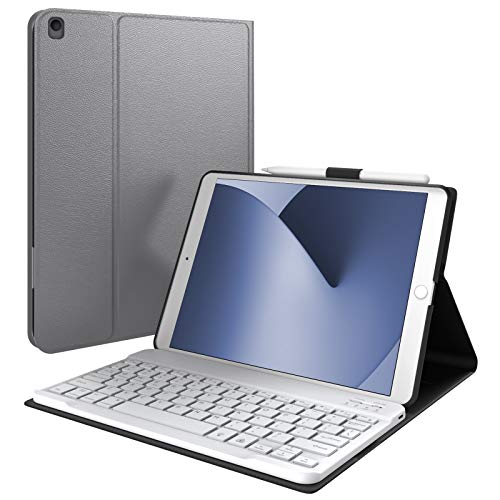
4-IN-1 MODES — ONE CASE DOES EVERYTHING — Laptop Mode: keyboard connected, kickstand up — type reports, answer emails, get work done. Drawing Mode: kickstand at a low angle, Apple Pencil in hand — sketch, annotate, take notes. Stand Mode: upright in landscape or portrait — video calls, streaming, following a recipe hands-free. Tablet Mode: keyboard off — read, browse, game on the couch. Four modes. One case. Zero swapping.
0-180° STEELESS KICKSTAND — FIND YOUR PERFECT ANGLE — The full 0-180° range. Type at 110° with the keyboard attached. Drop it to a shallow angle for drawing and sketching with Apple Pencil. Go portrait for reading long documents and scrolling feeds. The carbon-steel hinge is rated for 10,000+ open-and-close cycles — built to outlast your iPad. Landscape or portrait, keyboard on or off, you set the angle that works for what you're doing right now.
LAPTOP-CLASS TYPING — ACTUALLY ENJOYABLE — The 1.4mm scissor-switch keys give you real travel and real feedback — the kind that makes you forget you're typing on a tablet. iPadOS shortcut keys put brightness, volume, and media controls one tap away. 7 backlight colors with 3 brightness levels keep the keys readable whether you're in a dim lecture hall, a dark cabin, or your couch at midnight. Stable Bluetooth connection holds steady — no dropouts, no re-pairing.
PRECISE TRACKPAD — NAVIGATE LIKE A LAPTOP — Tap, pinch, swipe, scroll, drag — the multi-touch trackpad handles every iPadOS gesture without making you reach for the screen. Palm rejection keeps the cursor where you want it while you type, so you stop accidentally highlighting random text. Spreadsheets, documents, app switching — it all flows.
WEEKS BETWEEN CHARGES — A 500mAh battery delivers up to 100 hours of active typing and 180 days of standby. Most people charge once every two to three weeks. Charges with the same USB-C cable you already use. The keyboard sleeps after 10 minutes of inactivity and wakes with any key, right where you left off. A side holder keeps your Apple Pencil within reach. (Apple Pencil sold separately.)
Built for the Real World
The Nillkin Bumper Combo is a rugged 4-in-1 keyboard case built for people whose iPad needs to survive more than a coffee shop. Crowded commutes. Kitchens where kids do homework. Construction sites. Cross-country flights. The kind of places where "be careful" is not a protection strategy. Military-grade drop protection. Laptop-class typing. A 0-180° stepless kickstand that works in any position you need. This is the case that does not ask you to choose between protection and productivity.
Will this really protect my iPad from drops?
We dropped it so you don't have to. 1.2-meter drop tested — and that's on concrete, not carpet. Corner air-cushion bumpers absorb the impact. The reinforced frame and polycarbonate back meet military-grade drop standards. You feel how solid it is the moment you pick it up. The sliding camera cover protects your lens and your privacy — slide it open when you need it, closed when you don't. The faux leather exterior resists dirt, dust, and grime, and wipes clean after a long day on site or in the lab.
Does it fit my iPad model?
Made for iPad Air 13-inch (M4/M3/M2) and iPad Pro 12.9-inch (3rd-6th Gen). NOT compatible with iPad Pro 13-inch. Find your exact model number in Settings > General > About, then tap Model Number.
How do the 4 modes actually work day to day?
Laptop Mode: keyboard attached, stand up. Type reports, answer emails, do real work. Drawing Mode: keyboard off, kickstand at a low angle. Sketch with Apple Pencil, annotate slides, take handwritten notes. Stand Mode: upright in landscape or portrait. Video calls, streaming, following recipes — no hands needed. Tablet Mode: keyboard off. Read on the couch, browse in bed, game on the go. It's one case that replaces a laptop sleeve and a tablet stand. Four modes. No swapping.
Can I adjust the kickstand to any angle?
Yes — 0-180°, stepless. Tilt it back for typing reports. Drop it lower for drawing and sketching with Apple Pencil. Go full flat at 180° to share your screen across a conference table. Switch to portrait for reading or scrolling. The carbon-steel hinge is rated for 10,000+ cycles — it'll outlast your iPad. Unlike cases that lock you into two or three fixed positions, this one gives you the full range.
Is it heavy?
It has substance — intentionally. The weight keeps your iPad stable on uneven surfaces, planted on a workbench, and steady on your lap. If protection matters more to you than shaving ounces, you'll appreciate how secure this case feels. It weighs about as much as a hardcover book.
Can it handle really rough conditions?
This is what the Bumper Combo was built for. 1.2-meter drop tested onto concrete. Corner bumpers handle impacts from equipment and uneven ground. The keyboard detaches so you can wipe down the case without worrying about electronics. The camera cover keeps debris out of your lens. Engineers, field technicians, and construction crews use Nillkin cases as daily drivers for this reason. And if it survives a construction site, your daily commute is nothing.
How does the keyboard and trackpad hold up under real workloads?
The 1.4mm scissor-switch keys have real travel — not the mushy, shallow typing you get from cheaper keyboard cases. iPadOS shortcut keys put brightness, volume, and media controls one tap away. The multi-touch trackpad handles every gesture smoothly, and palm rejection stops the cursor from jumping around while you type. 7 backlight colors at 3 brightness levels — readable in a dark lecture hall, a red-eye cabin, or your living room at midnight. Stable Bluetooth keeps the connection solid.
Can I use the iPad without the keyboard?
That's half the point. Keyboard on for morning reports and essay writing. Keyboard off for afternoon reading, sketching, or gaming. 0-180° kickstand up for evening Netflix or FaceTime. The keyboard detaches and reattaches in seconds via a secure physical latch. A side holder keeps your Apple Pencil ready. (Apple Pencil sold separately.)
How long does the battery actually last?
Most people charge once every 2-3 weeks. The 500mAh battery delivers 100 hours of active typing and 180 days of standby per charge. Uses the same USB-C cable as your iPad — one less thing to carry. The keyboard sleeps after 10 minutes of inactivity, wakes with any key right where you left off. Check battery level anytime with a keyboard shortcut.
What makes the Bumper Combo different?
Three things you'd normally buy separately — all in one. A rugged protective case with 1.2-meter drop-tested military-grade protection: corner air-cushion bumpers, reinforced frame, and a sliding camera cover. A laptop-class detachable keyboard with 1.4mm scissor-switch keys, 7-color backlight, iPadOS shortcut row, and a precision trackpad with palm rejection. And a 0-180° stepless kickstand that gives you four modes — Laptop, Drawing, Stand, Tablet — without swapping a single accessory. Most keyboard cases make you choose between protection and typing quality. The Bumper Combo delivers both.
What's Included
Nillkin Bumper Combo Rugged Keyboard Case, USB-C charging cable, user manual. Apple Pencil sold separately.
The Nillkin Bumper Combo is a rugged 4-in-1 keyboard case built for people whose iPad needs to survive more than a coffee shop. Crowded commutes. Kitchens where kids do homework. Construction sites. Cross-country flights. The kind of places where "be careful" is not a protection strategy. Military-grade drop protection. Laptop-class typing. A 0-180° stepless kickstand that works in any position you need. This is the case that does not ask you to choose between protection and productivity.
Will this really protect my iPad from drops?
We dropped it so you don't have to. 1.2-meter drop tested — and that's on concrete, not carpet. Corner air-cushion bumpers absorb the impact. The reinforced frame and polycarbonate back meet military-grade drop standards. You feel how solid it is the moment you pick it up. The sliding camera cover protects your lens and your privacy — slide it open when you need it, closed when you don't. The faux leather exterior resists dirt, dust, and grime, and wipes clean after a long day on site or in the lab.
Does it fit my iPad model?
Made for iPad Air 13-inch (M4/M3/M2) and iPad Pro 12.9-inch (3rd-6th Gen). NOT compatible with iPad Pro 13-inch. Find your exact model number in Settings > General > About, then tap Model Number.
How do the 4 modes actually work day to day?
Laptop Mode: keyboard attached, stand up. Type reports, answer emails, do real work. Drawing Mode: keyboard off, kickstand at a low angle. Sketch with Apple Pencil, annotate slides, take handwritten notes. Stand Mode: upright in landscape or portrait. Video calls, streaming, following recipes — no hands needed. Tablet Mode: keyboard off. Read on the couch, browse in bed, game on the go. It's one case that replaces a laptop sleeve and a tablet stand. Four modes. No swapping.
Can I adjust the kickstand to any angle?
Yes — 0-180°, stepless. Tilt it back for typing reports. Drop it lower for drawing and sketching with Apple Pencil. Go full flat at 180° to share your screen across a conference table. Switch to portrait for reading or scrolling. The carbon-steel hinge is rated for 10,000+ cycles — it'll outlast your iPad. Unlike cases that lock you into two or three fixed positions, this one gives you the full range.
Is it heavy?
It has substance — intentionally. The weight keeps your iPad stable on uneven surfaces, planted on a workbench, and steady on your lap. If protection matters more to you than shaving ounces, you'll appreciate how secure this case feels. It weighs about as much as a hardcover book.
Can it handle really rough conditions?
This is what the Bumper Combo was built for. 1.2-meter drop tested onto concrete. Corner bumpers handle impacts from equipment and uneven ground. The keyboard detaches so you can wipe down the case without worrying about electronics. The camera cover keeps debris out of your lens. Engineers, field technicians, and construction crews use Nillkin cases as daily drivers for this reason. And if it survives a construction site, your daily commute is nothing.
How does the keyboard and trackpad hold up under real workloads?
The 1.4mm scissor-switch keys have real travel — not the mushy, shallow typing you get from cheaper keyboard cases. iPadOS shortcut keys put brightness, volume, and media controls one tap away. The multi-touch trackpad handles every gesture smoothly, and palm rejection stops the cursor from jumping around while you type. 7 backlight colors at 3 brightness levels — readable in a dark lecture hall, a red-eye cabin, or your living room at midnight. Stable Bluetooth keeps the connection solid.
Can I use the iPad without the keyboard?
That's half the point. Keyboard on for morning reports and essay writing. Keyboard off for afternoon reading, sketching, or gaming. 0-180° kickstand up for evening Netflix or FaceTime. The keyboard detaches and reattaches in seconds via a secure physical latch. A side holder keeps your Apple Pencil ready. (Apple Pencil sold separately.)
How long does the battery actually last?
Most people charge once every 2-3 weeks. The 500mAh battery delivers 100 hours of active typing and 180 days of standby per charge. Uses the same USB-C cable as your iPad — one less thing to carry. The keyboard sleeps after 10 minutes of inactivity, wakes with any key right where you left off. Check battery level anytime with a keyboard shortcut.
What makes the Bumper Combo different?
Three things you'd normally buy separately — all in one. A rugged protective case with 1.2-meter drop-tested military-grade protection: corner air-cushion bumpers, reinforced frame, and a sliding camera cover. A laptop-class detachable keyboard with 1.4mm scissor-switch keys, 7-color backlight, iPadOS shortcut row, and a precision trackpad with palm rejection. And a 0-180° stepless kickstand that gives you four modes — Laptop, Drawing, Stand, Tablet — without swapping a single accessory. Most keyboard cases make you choose between protection and typing quality. The Bumper Combo delivers both.
What's Included
Nillkin Bumper Combo Rugged Keyboard Case, USB-C charging cable, user manual. Apple Pencil sold separately.
Sold by
Amazon Warehouse
Official Amazon outlet for open-box & returned items
- Backed by Amazon's A-to-Z Guarantee
- 30-day return policy
- Ships from Amazon fulfillment centers
- Price verified on Amazon
Product Details
- SKU:
- awhd-us-b0c8j8vsqn
- Model:
- Bumper Combo
- Country:
- US
- ASIN:
- B0C8J8VSQN
Shopping Smarter
Common questions about buying open-box and refurbished.
Why buy refurbished or open-box?
Refurbished and open-box products offer the same performance as new at a fraction of the price. They've been inspected, tested, and are ready to use — the only difference is the price tag. Buying refurbished also reduces electronic waste, extending product life cycles and keeping functional devices out of landfills.
What's the difference between open-box and refurbished?
Open-box products are customer returns that have been inspected and confirmed functional. They may show little to no use — often the item was returned simply because the buyer changed their mind. Refurbished products have been professionally repaired or restored by technicians, tested to meet or exceed manufacturer specifications, and sometimes come with a warranty. Both are a smart alternative to buying new.
Why use OpenBoxFox?
Finding refurbished deals is time-consuming — you'd have to check Amazon Warehouse, Reebelo, Dyson Outlet, and others separately for Nillkin products. OpenBoxFox aggregates these listings in one place, so you can compare and find the best deal without the legwork. We update pricing daily so you always see current availability and real savings.
Is it safe to buy refurbished?
Yes. Products listed on OpenBoxFox come from established retailers like Amazon, Reebelo, and Dyson — not unknown third-party sellers. Each retailer has buyer protection policies, return windows, and in some cases warranties. You get the price advantage of used goods with the purchase security of a known retailer.
More open-box deals
Updated daily from Amazon, Reebelo, and Dyson.