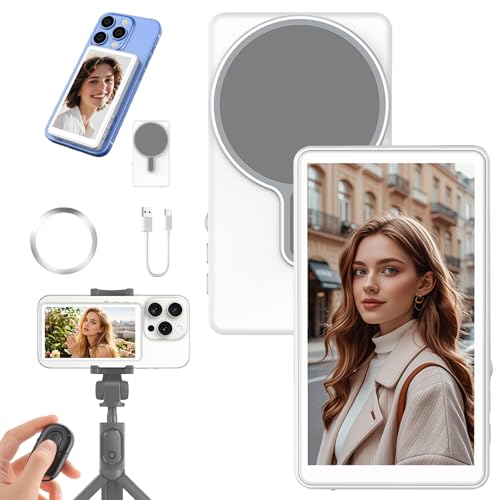
【Wireless Real-Time Mirroring & Back Rear Camera Selfie Monitor】Ditch blurry selfies and messy cables! Instantly connect to your phone screen via wireless technology, turning your high-quality rear camera into a perfect selfie tool with real-time, lag-free preview. Features easy magnetic/clip-on attachment, universal compatibility, and seamless performance for live streaming, vlogging, and TikTok/YouTube content—capture pro-level angles every time
【Strong Magnetic Phone Selfie Monitor】Easily attaches to the back of your iPhone (12-16 series) with powerful magnets for a secure, slip-free hold. Includes a sticky magnetic sheet simply apply the metal ring for instant compatibility for non-magnetic phones like iPhone 11 & below—no risk of dropping, Adjust angles freely for perfect framing
【Effortless Wireless Control】Vlog selfie monitor screen comes with a wireless Bluetooth remote control, offering a stable 33ft range for seamless selfies, video recording, and mode switching—perfect for group shots, vlogging, and live streaming. Stay pro on the go with this MagSafe-compatible, all-scenario companion, Compatible with most smartphones and designed for hassle-free, hands-free creativity
【4-inch HD Flip Screen with 3-Level Brightness & One-Tap Rotation】Enjoy crystal-clear monitoring on the 4-inch HD display, adjustable to Low/Medium/High brightness for optimal visibility in any lighting. Instantly flip the screen 180° to correct upside-down views or switch to cinematic wide-angle mode—perfect for vlogging, selfies, and professional shots. The magnetic design ensures hassle-free use while the rotation button guarantees a seamless, inverted-free experience
【All-Day Power & Ultra-Portable Design】Enjoy all-day creativity with a long-lasting 1800mAh battery, The all-in-one kit includes a USB-C cable, and metal adapters for easy storage and charging compatibility (works with power banks, laptops, and car chargers),Sleek, lightweight, and travel-ready, this pocket-sized monitor (just 0.22 lbs) fits effortlessly in bags or pockets, perfect for travel, vlogging, streaming, outdoor adventures shoots or live streaming without interruption
Steps to Connect Your Phone
Step 1:
Swipe down from the top-right corner of your phone screen to
open the quick menu bar.
Step 2:
Locate the screen mirroring feature:
On iPhones, select "Screen Mirroring.
On Android phones, choose "Wireless Projection"
Or go to Settings > More Connections > Screen Mirroring.
Step 3:
In the list of available devices, find "iScreen_p2p" and tap to connect.
For the frst connection, enter the verifcation code: 1234.
Power Switch: Toggle the switch to turn the device on or off.
Charging Indicator Light:
Red Light On: Charging in progress.
Red Light Off: Fully charged.
Screen Rotation Button: Rotate the screen 180° for versatile viewing angles
Display Ratio Button: Switch between Full-Screen Mode and 1:1 Mode to matchyour preferences.
Important Note:For optimal performance, charge the device while it is powered off.