Add to favorites


Keyboard Case for Samsung Galaxy Tab S11 Ultra/S10 Ultra/S9 Ultra/S8 Ultra — Open-Box
Brand: FOGARI
Condition: Used
$3134
Updated: 3 days ago
Description
【Compatibility】This Samsung Galaxy Tab S11 Ultra Keyboard Case(2025 (SM-X930/X936B)) is compatible with 14.6 inch S10 Ultra 2024 (SM-X920/X926B) / S9 Ultra 2023 (SM-X910/X916B) , Incompatible with any other model, Please check the model on the back of the device before purchasing to ensure compatibility
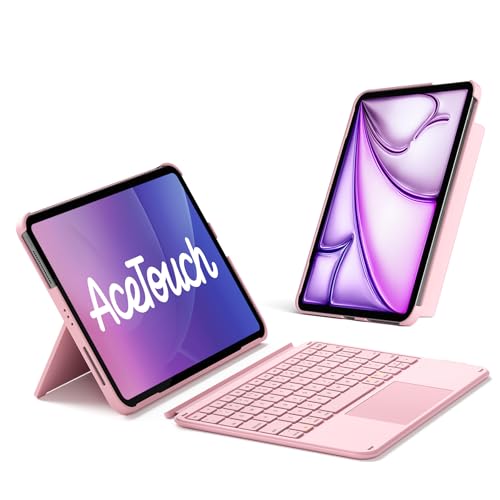
【Magnetic Removable Keyboard】 This wireless detachable keyboard with magnetic tape greatly improves the freedom of operation. The magnetism can be easily located and removed from the casing, with fast response speed and smooth operation
【Long Life Rechargeable Battery】 equipped with a large capacity battery, it can be charged for 2-3 hours and used for at least 90-120 hours, which is more energy-efficient and low-power, making it an excellent choice for travel
【High Quality Material Production】 Suitable for 14.6-inch Samsung Galaxy Tab S11 Ultra keyboard shell made of high-quality PU material, soft and smooth, drop resistant, wear-resistant, can protect the tablet from scratches, precise cutting allows full access to all ports, speakers, microphones, and cameras
【Built-in Pencil Holder】Smart book cover for galaxy tab s11 ultra keyboard leaves space for the stylus to be charged and compatible, and will not hinder the combination of the Stylus and the tablet. No need to worry about the Stylus getting lost, running around, or inconvenient to carry. (NOTE: Tablet and pen are not included!)
【More Comfortable Experience】 The keyboard protective case adopts scissor foot structure keys with rebound function, comfortable typing feel, moderate key travel, and the protective case has grooves that can adjust the viewing angle according to needs, making your tablet stand firmly and improving the user experience
【Adjustable Viewing Angles】This for 14.6 inch Galaxy Tab S11 Ultra sturdy leather case with keyboard has 3 anti-slip grooves to adjust the viewing angle as you like, make your tablet stand steadily. Turn your S11 ultra tablet into a laptop in one second, perfect for studying, working, writing, painting, reading or watching videos.
【About Our Services】 The package includes 1 x Keyboard case for the Samsung Galaxy Tab S11 Ultra, 1 x wireless keyboard, 1 x Type-C charging cable, 1 x user manual.and 24/7 friendly customer service. If you have any questions, please feel free to contact us by leaving a message, and we will be available to assist you at any time. Your satisfaction is our top priority
How to Connect a Keyboard
1. Turn on the keyboard and your Bluetooth on your tablet.
2. Open the keyboard Bluetooth through the shortcut "Fn+C".
3. Select "Bluetooth Keyboard" in your tablet's Bluetooth settings to connect successfully.
4. You won't need to repeat these steps next time—just wait 3 seconds for the keyboard to connect automatically
How to Select the Operating System and Language Before Using the Keyboard
1. Switch operating systems: iOS: Press "Fn+E"; Android: Press "Fn+Q"; Windows: Press "Fn+W".
2. Switch the input method to British English: Press "Control + Space" or "Fn+Space"
Backlight Adjustment (Backlit Keyboards Only)
1. Press the "Fn" key, then press the key with the light bulb icon once to turn on the backlight; press it again to increase the brightness; press it a third time to maximize the brightness; and press it a fourth time to turn off the backlight.
2. Press the "Fn" key, then press the key with the light bulb icon to cycle through the 7 backlight colors
How to Enable Assistive Touch (Touchpad Keyboards Only)
Go to the iPad's Accessibility settings to enable the AssistiveTouch feature:
Settings > Accessibility > Touch > AssistiveTouch (Turn it on)
(This step is not required for Android or Windows systems.)
Sold by
Amazon Warehouse
Official Amazon outlet for open-box & returned items
- Backed by Amazon's A-to-Z Guarantee
- 30-day return policy
- Ships from Amazon fulfillment centers
- Price verified on Amazon
Product Details
- SKU:
- awhd-us-b0gtyxlyw1
- Country:
- US
- ASIN:
- B0GTYXLYW1
Shopping Smarter
Common questions about buying open-box and refurbished.
Why buy refurbished or open-box?
Refurbished and open-box products offer the same performance as new at a fraction of the price. They've been inspected, tested, and are ready to use — the only difference is the price tag. Buying refurbished also reduces electronic waste, extending product life cycles and keeping functional devices out of landfills.
What's the difference between open-box and refurbished?
Open-box products are customer returns that have been inspected and confirmed functional. They may show little to no use — often the item was returned simply because the buyer changed their mind. Refurbished products have been professionally repaired or restored by technicians, tested to meet or exceed manufacturer specifications, and sometimes come with a warranty. Both are a smart alternative to buying new.
Why use OpenBoxFox?
Finding refurbished deals is time-consuming — you'd have to check Amazon Warehouse, Reebelo, Dyson Outlet, and others separately for FOGARI products. OpenBoxFox aggregates these listings in one place, so you can compare and find the best deal without the legwork. We update pricing daily so you always see current availability and real savings.
Is it safe to buy refurbished?
Yes. Products listed on OpenBoxFox come from established retailers like Amazon, Reebelo, and Dyson — not unknown third-party sellers. Each retailer has buyer protection policies, return windows, and in some cases warranties. You get the price advantage of used goods with the purchase security of a known retailer.