Add to favorites



iDsonix Tool Free USB 3.0/2.0 to SATA 2.5/3.5 Inch Hard Drive Docking Station with 3.3 Feet USB 3.0 Cable for HDD/SSD Support 8TB and UASP, Fast Heat Dissipation- Black — Open-Box
Brand: iDsonix
Condition: Used - Mint
$1971
Updated: Yesterday
Description
HDD External Hard Drive Docking Station, Max Support 8TB
SATAIII/II/I External Hard Drive Enclosure, Compatible with Windows, Mac Os, Linux
USB 3.0 Hard Drive Disk External Enclosure, 5Gpbs SuperSpeed Data Transfer
USB 3.0 Tool-free HDD Enclosure, Plug and Play, No Driver Needed, Back Support USB2.0/1.1 Too
USB 3.0 SATA 2.5 3.5 Inch Hard Drive Reader, CE, FCC Approved, 18 Months Warranty
iDsonix Super Speed USB 3.0/2.0 to SATA Hard Drive Docking Station For 2.5 or 3.5in HDD/SSD Tool Free Design provides a simple, fast, and cost effective solution for data recovery, drive imaging, and testing centers, or any environment that requires fast access to uninstalled/archived drives. Power LED light indicator Shows the power and hard drive R/W status. Plug & Play Enabled, No Additional Driver and Application is needed.
Instruction
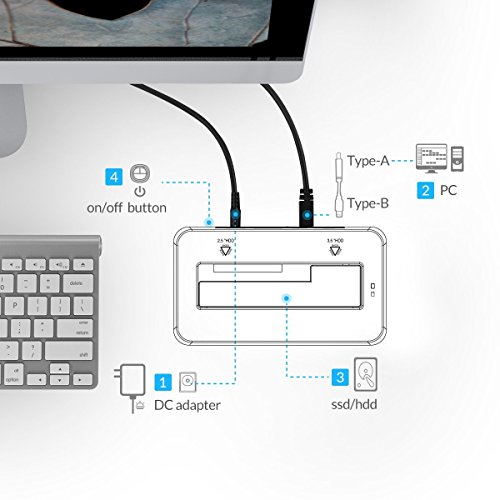
1. Plug in the power cord to the Dock
2. Connect the Dock to the host computer
3. Insert the 2.5" or 3.5" SATA drive
4. Switch on power
5. The operation system will detect that hard drive has been connected
Technical Specifications
* Supports USB 1.1/2.0/3.0 and SATA I/II/III
* Supports SuperSpeed USB 3.0 data transfer rate up to 5Gbps, 10x Faster than USB2.0
* Supports any 7mm, 9.5mm, 12.5mm or 14.5mm slim 2.5 inch laptop SATA Hard Drive and Solid State Disk
* Supports Any 3.5 inch SATA Hard Drive and Solid State Disk up to 8TB
What's in the Box
- 1x iDD-U3102 Tool Free USB3.0 Hard Drive Dock
- 1x 12V3A Power Adapter
- 1x 3.3 Ft. USB3.0 Cable
- 1x User's Manual
- 1x Service Card Note: When you found the HDD dock couldn’t work, please calm down and attention A new drive must be formatted before using. Please attach the iDsonix device, with the drive inside, to the computer. Right click on "My Computer" and select "Manage". Open "Disk management" under "Storage" folder. We can see all HDDs and SSDs here. You can right-click on them and format them. You could send a screen shot of the "Disk Management" to us for quick analysis and support after check the HDD,PC USB port or cables are all OK.
Instruction
1. Plug in the power cord to the Dock
2. Connect the Dock to the host computer
3. Insert the 2.5" or 3.5" SATA drive
4. Switch on power
5. The operation system will detect that hard drive has been connected
Technical Specifications
* Supports USB 1.1/2.0/3.0 and SATA I/II/III
* Supports SuperSpeed USB 3.0 data transfer rate up to 5Gbps, 10x Faster than USB2.0
* Supports any 7mm, 9.5mm, 12.5mm or 14.5mm slim 2.5 inch laptop SATA Hard Drive and Solid State Disk
* Supports Any 3.5 inch SATA Hard Drive and Solid State Disk up to 8TB
What's in the Box
- 1x iDD-U3102 Tool Free USB3.0 Hard Drive Dock
- 1x 12V3A Power Adapter
- 1x 3.3 Ft. USB3.0 Cable
- 1x User's Manual
- 1x Service Card Note: When you found the HDD dock couldn’t work, please calm down and attention A new drive must be formatted before using. Please attach the iDsonix device, with the drive inside, to the computer. Right click on "My Computer" and select "Manage". Open "Disk management" under "Storage" folder. We can see all HDDs and SSDs here. You can right-click on them and format them. You could send a screen shot of the "Disk Management" to us for quick analysis and support after check the HDD,PC USB port or cables are all OK.
Sold by
Amazon Warehouse
Official Amazon outlet for open-box & returned items
- Backed by Amazon's A-to-Z Guarantee
- 30-day return policy
- Ships from Amazon fulfillment centers
- Price verified on Amazon
Product Details
- SKU:
- awhd-us-b00fdlctqo
- Model:
- iDD-U3102-BK
- Country:
- US
- ASIN:
- B00FDLCTQO
Shopping Smarter
Common questions about buying open-box and refurbished.
Why buy refurbished or open-box?
Refurbished and open-box products offer the same performance as new at a fraction of the price. They've been inspected, tested, and are ready to use — the only difference is the price tag. Buying refurbished also reduces electronic waste, extending product life cycles and keeping functional devices out of landfills.
What's the difference between open-box and refurbished?
Open-box products are customer returns that have been inspected and confirmed functional. They may show little to no use — often the item was returned simply because the buyer changed their mind. Refurbished products have been professionally repaired or restored by technicians, tested to meet or exceed manufacturer specifications, and sometimes come with a warranty. Both are a smart alternative to buying new.
Why use OpenBoxFox?
Finding refurbished deals is time-consuming — you'd have to check Amazon Warehouse, Reebelo, Dyson Outlet, and others separately for iDsonix products. OpenBoxFox aggregates these listings in one place, so you can compare and find the best deal without the legwork. We update pricing daily so you always see current availability and real savings.
Is it safe to buy refurbished?
Yes. Products listed on OpenBoxFox come from established retailers like Amazon, Reebelo, and Dyson — not unknown third-party sellers. Each retailer has buyer protection policies, return windows, and in some cases warranties. You get the price advantage of used goods with the purchase security of a known retailer.