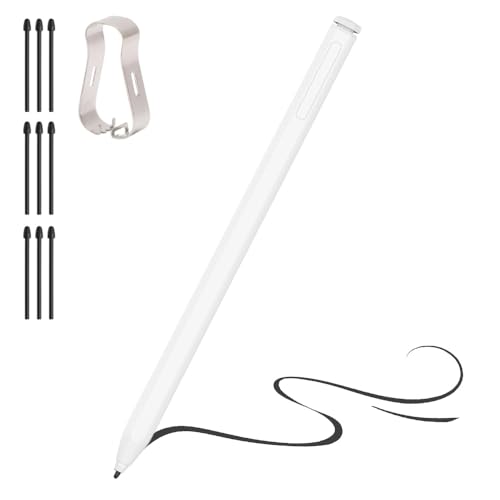


DAXINGXING Stylus, 2-in-1 Stylus Pens for Touch Screens, 5 White — Open-Box, 10% Off
Brand: DAXINGXING
Description
【Stylus Pen for Touchscreen】Our stylus pen requires no other connections required pairing or charging, you can unleash your creativity anytime and anywhere, just pick up the stylus and express your thoughts freely on the touch screen.
【2-in-1 Stylus】The stylus is made of lightweight alloy, and the pen tip adopts a diamond-shaped checkered design that is highly recognizable. There are rubber pen tip designs of different sizes on both ends, suitable for different usage scenarios. The stylus frees up your fingers and provides greater sensitivity and screen performance.
【High Sensitivity & Precision】The ipad stylus can flexibly fit on the screen without delays, interruptions, or screen scratches, allowing you to have a smoother writing or drawing experience and enhance your creative pleasure.
【Wide Compatibility】Universal styluses for use with touch screen devices including smartphones, Apple iPad/ iPhone/ iPod/ Android tablets and other capacitive touch screen devices. You can use it like a real pen.
【Stylus Pen Set】You will get 5 stylus pens white and 5 0.27-inch, 5 0.21-inch replaceable rubber pen tips in one package. If you have any questions about the stylus pen for touchscreen, please feel free to contact our customer service team, We will solve it for you as soon as possible.
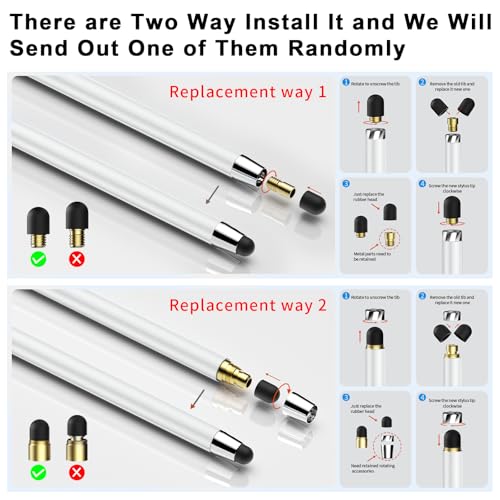
DAXINGXING 5-PACK WHITE DUAL-TIP STYLUS PENS FOR CAPACITIVE TOUCHSCREENS Keep a comfortable touchscreen tool within reach at home, in the classroom, at the office, or while traveling. The DAXINGXING stylus pen set includes five white passive capacitive stylus pens, giving family members, students, teachers, coworkers, or individual users an easy way to place and share pens across multiple devices. Each stylus is ready to use as soon as it is removed from its individual clear bag. No charging cable, battery, Bluetooth connection, app, driver, or pairing process is required. These stylus pens are designed to perform the same basic capacitive touchscreen actions as a fingertip. Use them to tap icons, type on an on-screen keyboard, scroll through articles, turn digital pages, browse websites, navigate menus, sign forms, make simple notes, color in drawing apps, or operate compatible touch controls in games. If a capacitive touchscreen responds normally to your fingertip, it should also respond to this passive stylus. TWO RUBBER TIP SIZES ON EVERY PEN Each DAXINGXING stylus has one 0.21-inch small rubber tip and one 0.27-inch wide rubber tip installed on opposite ends. Both tips are black, soft, replaceable, and available without removing the other end. The smaller 0.21-inch tip provides better control when selecting small icons, entering text, signing a name, making simple lines, or working in areas where a wider fingertip can cover too much of the screen. It is a practical choice for on-screen keyboards, menus, casual writing, basic drawing, and precise single-point taps. The wider 0.27-inch tip offers a comfortable contact area for scrolling, swiping, page turning, browsing, coloring, filling larger areas, and general screen navigation. It is useful when the task involves repeated movement across the display rather than selecting a small target. There is no complicated switching mechanism. Both sizes are already attached to the stylus, so simply turn the pen around to move from one tip to the other. The stylus can also be held at a natural angle during ordinary touchscreen use. This physical angle flexibility should not be confused with electronic tilt sensing, which is an active digital-pencil feature and is not included. 10 EXTRA REPLACEMENT TIPS INCLUDED Rubber stylus tips are contact parts that can gradually wear depending on how frequently they are used, how much force is applied, the condition of the screen, and how the pens are stored. Instead of requiring the entire stylus to be discarded when a tip becomes worn, both ends of every DAXINGXING stylus are replaceable. The package includes five white dual-tip stylus pens, with one 0.21-inch small rubber tip and one 0.27-inch wide rubber tip pre-installed on each pen. It also includes 10 additional black replacement rubber tips: five small 0.21-inch tips and five wide 0.27-inch tips. No installation tool is needed. To replace a worn tip, hold and unscrew the tip assembly, remove the old rubber tip from the small metal insert, fit the matching replacement rubber tip over the metal part, and screw the assembly back onto the stylus. Make sure the assembly is secure before touching the screen. For normal switching between the small and wide tips, no disassembly is needed; simply flip the pen. COMPATIBILITY BASED ON FINGERTIP TOUCH DAXINGXING passive stylus pens are intended for capacitive touchscreens. They can be used with compatible iPad models, iPhones, Android smartphones and tablets, touchscreen Kindle models and other e-readers, Chromebooks, touchscreen laptops, gaming tablets, and other devices that accept normal fingertip input. A simple compatibility check is to touch the screen with your finger. If the display recognizes ordinary fingertip taps and swipes, the stylus should provide the same type of basic input. This also makes the pens useful for older devices when those devices have a functioning capacitive touchscreen. A device name or release year alone does not determine compatibility; the screen technology does. The stylus will not add touch capability to a non-touchscreen display. It may also be unsuitable for screens that use a different input technology or for functions that require a proprietary active pen. It does not connect electronically to the device and cannot unlock device-specific pen functions. SCREEN PROTECTORS The same fingertip test applies when a screen protector is installed. If the protected screen still responds normally to a finger, the stylus should also work for basic capacitive touch input. A damaged, unusually thick, dirty, or poorly installed protector may affect touchscreen response for both fingers and passive styluses. Keep the display and rubber tip clean. Dust, grit, or debris trapped between any stylus and a screen can interfere with movement and may mark the display. Replace a tip if it becomes torn, loose, hardened, or visibly worn. FOR SMARTPHONES AND TABLETS Use the smaller tip to select app icons, enter text, tap links, sign a delivery form, or navigate controls on a phone or tablet. Use the wider tip to scroll through social feeds, browse photos, turn pages, read articles, or move through menus. Because the stylus behaves like a fingertip, it works without changing Bluetooth settings or installing a companion app. FOR READING AND KINDLE TOUCHSCREENS On Kindle models and other e-readers with a compatible capacitive touchscreen, the stylus can replace a fingertip for page turning, menu selection, highlighting controls, and general navigation. It will not work with a non-touchscreen reader, and it does not add handwriting functions that the device or reading app does not already support. FOR HOME, SCHOOL, AND OFFICE A set of five white pens makes it easy to place styluses in several locations or assign them to different people, devices, or purposes. Keep one near a tablet, phone, touchscreen laptop, reception counter, classroom device, work station, or shared family screen. The pens can be used for everyday navigation, classroom activities, digital worksheets that accept touch, simple annotations, checklists, signatures, and other routine touchscreen tasks. The set includes five white stylus pens. Every pen is individually packed in a clear plastic bag inside the paper box. FOR DRAWING, COLORING, NOTES, AND SIGNATURES The stylus works in drawing, coloring, note-taking, and signature apps when the app allows finger or touch input. The 0.21-inch tip offers better control than the wider tip for small selections and simple lines, while the 0.27-inch tip is comfortable for coloring and broader movements. This product is a passive rubber-tip stylus rather than an active digital pencil. It is suitable for casual drawing, coloring, simple notes, signatures, and ordinary touch commands, but it should not be expected to perform like an Apple Pencil or another powered professional stylus. It does not provide pressure sensitivity, palm rejection, electronic tilt sensing, hover functions, programmable buttons, an electronic eraser, or pixel-level precision. Some apps that support Apple Pencil also allow drawing with a fingertip. In those apps, the DAXINGXING stylus can be used for the same basic touch input that a finger provides. If an app is set to accept input only from an Apple Pencil or another active pen, enable the app's finger-drawing option when available. Apple Pencil-only tools and features will remain unavailable. FOR TOUCHSCREEN GAMES Both rubber tips can be used for ordinary single-finger taps and swipes in games that accept touchscreen input. The small tip can help when selecting smaller on-screen buttons, while the wide tip is comfortable for swiping and general navigation. The stylus does not provide multi-touch gestures, controller buttons, motion controls, or active gaming-pen functions. Game compatibility depends on whether the game accepts normal fingertip touch commands. LIGHTWEIGHT ALLOY PEN BODY Each stylus measures approximately 5.31 inches long and 0.31 inches in diameter and weighs about 0.37 ounces, or 10.4 grams. The slim alloy body has a familiar pen-like shape that is easy to carry and use for everyday tapping, scrolling, and browsing. The diamond-patterned texture is located only on the metal tip interfaces at both ends. The stylus does not include a pocket clip. The alloy body is intended for regular daily handling, while the soft rubber tips are replaceable wear parts. There is no fixed tested lifespan for either a stylus or a rubber tip. Actual service life varies with frequency of use, pressure, screen condition, handling, and storage. The included replacement tips help keep the pens useful after the original tips become worn. FREQUENTLY ASKED QUESTIONS Q: Does this stylus require charging? A: No. It is a passive capacitive stylus with no battery or electronic charging system. There is no charging cable in the package. Q: Does it require Bluetooth, pairing, an app, or setup? A: No. Pick up the stylus and use it directly on a compatible capacitive touchscreen. Q: Can it be used on a smartphone? A: Yes, when the smartphone has a functioning capacitive touchscreen that responds to a fingertip. This includes compatible iPhone and Android models. Q: Does it work with all iPad models? A: It can perform normal fingertip-style touch commands on iPads with functioning capacitive touchscreens. It does not provide Apple Pencil-specific features. Q: Can it be used on a Kindle? A: Yes, on Kindle models with a compatible capacitive touchscreen. It will not work on non-touchscreen models or create functions that the Kindle does not already support. Q: Does it work with older devices? A: The age of the device is not the main factor. It should work when the device has a functioning capacitive touchscreen that recognizes normal finger input. Q: Can it be used on all touchscreen devices? A: It is designed for capacitive touchscreens that respond to a fingertip. It will not work on non-touchscreen displays and may not work with screens that use another touch technology. Q: Does it work with drawing apps? A: Yes, when the app allows drawing or input by finger. Some apps may require the finger-drawing option to be enabled. Q: Is it good for drawing? A: It is suitable for casual drawing, coloring, simple lines, signatures, and basic notes. It is not a powered professional drawing pencil and does not include pressure sensitivity or palm rejection. Q: How accurate is the writing? A: The 0.21-inch tip gives better control for small touch targets, signatures, and simple writing than the 0.27-inch tip. Because this is a passive rubber-tip stylus, no pixel-level or numerical accuracy specification is claimed. Q: Is it compatible with Apple Pencil apps? A: It can provide basic fingertip-style input in apps that allow touch or finger drawing. Features that specifically require an Apple Pencil, including pressure sensitivity and palm rejection, are not supported. Q: Can the tips be used for gaming? A: Yes, for games that accept normal single-finger taps and swipes. The stylus does not replace multi-touch gestures or a game controller. Q: What is the difference between the two tips? A: The 0.21-inch tip is better for smaller controls, typing, signatures, and simple lines. The 0.27-inch tip is better for scrolling, swiping, page turning, coloring, and general navigation. Q: Is it easy to switch between tips? A: Yes. Both tips are installed on opposite ends, so turn the stylus around to switch sizes. Q: Are both tips replaceable? A: Yes. Both the small and wide rubber tips can be removed and replaced without tools. Q: Are the replacement tips easy to install? A: Unscrew the tip assembly, fit the correct replacement rubber tip over the small metal insert, and screw the assembly back onto the pen. Check that it is secure before use. Q: Is the stylus durable for daily use? A: The stylus has an alloy body for regular handling. The rubber tips are replaceable contact parts and can be changed when worn. Q: How long does each stylus last? A: There is no fixed tested lifespan. Durability depends on frequency of use, pressure, screen condition, handling, and storage. The package includes 10 replacement tips to support continued use. Q: Is it easy to hold? A: Each pen is approximately 5.31 inches long, 0.31 inches in diameter, and 0.37 ounces in weight, giving it a lightweight, familiar pen-like profile. Q: What is included in the bundle? A: You receive five white dual-tip stylus pens, with one small and one wide rubber tip pre-installed on each pen. The set also includes 10 extra black replacement tips: five small 0.21-inch tips and five wide 0.27-inch tips. Q: Why choose DAXINGXING stylus pens? A: The set combines five white stylus pens for sharing and organization, two useful rubber tip sizes on each pen, 10 additional replacement tips, lightweight alloy bodies, and broad capacitive touchscreen compatibility without charging or setup. PACKAGE CONTENTS 5 white DAXINGXING dual-tip capacitive stylus pens, with one 0.21-inch small tip and one 0.27-inch wide tip pre-installed on each pen 5 replacement 0.21-inch black rubber tips 5 replacement 0.27-inch black rubber tips DAXINGXING stylus pens provide a simple, reusable way to tap, swipe, scroll, browse, color, sign, and navigate compatible capacitive touchscreens. Choose the smaller tip for better control, choose the wider tip for comfortable movement, and replace either rubber tip when it becomes worn. No charging and no setup - just fingertip-style touchscreen control in a lightweight 5-pen set.
Sold by
Amazon Warehouse
Official Amazon outlet for open-box & returned items
- Backed by Amazon's A-to-Z Guarantee
- 30-day return policy
- Ships from Amazon fulfillment centers
- Price verified on Amazon
Product Details
- SKU:
- awhd-us-b0f1xz2tvb
- Model:
- C-02
- Country:
- US
- ASIN:
- B0F1XZ2TVB
Shopping Smarter
Common questions about buying open-box and refurbished.