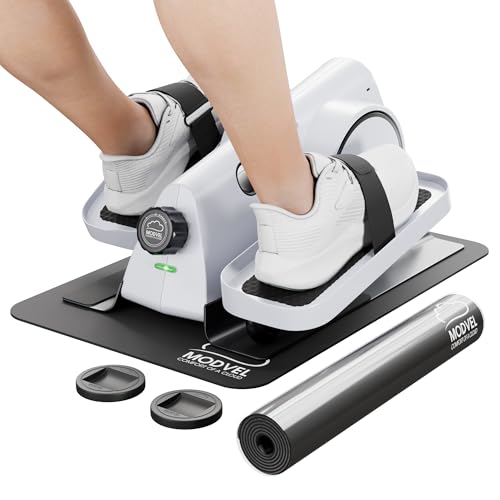
DamKee Under Desk Elliptical Exercise Machine, Electric Ellipse Leg Exerciser as Seen on TV, 15 Speeds Foot Exerciser While Sitting for Seniors, Portable Seated Pedal Exerciser for Home Office, Gifts — Open-Box, 39% Off
Brand: Damkee
Description
Exercise Anywhere Anytime: The leg exerciser suits office workers, the elderly, and rehab users. Use it under your desk, on a home chair, or by the sofa while watching TV. Its low-impact workout is gentle on joints. It relaxes leg muscles, boosts blood circulation, burns calories, improves heart health, strengthens muscles, and aids leg recovery. It's a convenient way to stay active throughout the day.
3 Workout Modes: This leg exerciser offers 3 modes. In non-electric mode, pedal manually without a power cable. Auto mode provides 15 preset programs (P1-P15), running for 30 minutes with automatic speed and direction selection. Switch programs with the Auto button. In HR (manual) mode, set your own direction (forward or reverse), workout time from 1–30 minutes, and speed levels from 1–15 via the machine’s panel or remote control.
15 Adjustable Speeds & 2 Movement Directions (Forward and Reverse): This training machine features 15 adjustable speeds and 2 movement directions. These options let you customize your exercise routine. Whether for rehabilitation, building leg strength, or relaxing foot joints, you can easily find the right speed and mode for your needs.
Intelligent Control System: This under-desk bike pedal exerciser has two control methods: a large LCD touch screen for you to adjust speed, time, mode, directions, and monitor sports data, and a remote control. The remote control is great for those who want to adjust the machine without bending, especially suitable for the elderly and those with limited mobility. Also, don't use the machine while standing.
Package Includes: Leg Exercise Machine Body x1, Foot Pedals (L/R) x2, Power Cord x1, Remote Control x1, Screwdriver x1, Screws x4, Mute Strips x2, User Manual x1. Simple pedal assembly required. Tools included.
Quiet Motor & Portable: Enjoy leg exercises while working, watching TV, reading, or during a meeting without any worry of being interrupted or disturbing others, thanks to the quiet motor (with noise less than 15db). Its hidden handle design enables easy movement to any desired location, making it an excellent choice for the whole family's home workouts.
Great Gift Choice: This leg exercise machine is an ideal holiday or birthday gift for friends, parents, or grandparents. It's a token of care for their health, fitting both fitness enthusiasts and those needing gentle exercise. Its user-friendly and compact design makes it a practical and thoughtful present.
Q1: How to turn on or turn off the device? A: After plugging in the power, you can operate in two ways: 1) Press the "⏻" button on the LCD screen to turn it on, and long-press the "⏻" button for 3 seconds to turn it off; 2) Press the "POWER" button on the remote control to directly turn it on or off. Q2: How to start or stop the device? A: After the device is turned on, you can operate in two ways: 1) Press the "⏻" button on the LCD screen (shared for power on, start, and stop); 2) Press the "START/STOP" button on the remote control. Q3: How to switch modes using the remote control? A: Directly press the "MODE" button on the remote control to switch to Auto Mode (P1-P15) or Manual Mode (HR). Q4: How to adjust speed using the remote control? A: In HR (Manual) mode, you can press the "SPEED +/-" buttons on the remote control to adjust the speed. Please note that speed cannot be switched in Auto Mode, as the speed is automatically adjusted by the system. Q5: How to switch the movement direction using the remote control? A: In HR (Manual) mode, press the "DIRECTION" button on the remote control to switch the direction. Please note that the movement direction cannot be manually switched in Auto Mode, as the direction is automatically switched by the system. Q6: How to adjust time using the remote control? A: In HR (Manual) mode, first stop the device, press the "FUNCTION" button on the remote control to switch to the time display interface, then press the "TIME +/-" buttons to increase or decrease the time (in 1-minute increments, range: 1-30 minutes). Q7: How to switch modes using the LCD touch screen? A: Directly press the "MODE" button on the LCD screen to switch to Auto Mode (P1-P15) or Manual Mode (HR). Q8: How to switch speed and movement direction using the LCD touch screen? A: In HR (Manual) mode, press the "SPEED +/-" buttons on the LCD screen to adjust the speed, and press the "DIRECTION" button on the screen to switch the movement direction. Q9: How to adjust time using the LCD touch screen? A: In HR (Manual) mode, first press the "⏻" button on the screen (shared for power on, start, and stop) to stop the device, press the "FUNCTION" button to switch to the time display interface, then press the "TIME +/-" buttons to adjust (in 1-minute increments, range: 1-30 minutes). Q10: How to switch between P1-P15 modes? A: In Auto Mode, press the "MODE" button on the LCD screen or the "MODE" button on the remote control to switch. Q11: What are the differences between Auto Mode and Manual Mode? A: Auto Mode has a default duration of 30 minutes, including 15 levels (P1-P15). The speed, direction, and time are preset by the system and cannot be manually adjusted. Manual Mode also has a default duration of 30 minutes, but you can set the speed, direction, and time manually. The default speed is Level 1, and the default direction is forward. Q12: What do the data on the display screen mean? A: "Speed 01" indicates Level 1 speed; "Calories 1" indicates 1 calorie burned; "Counter 1" indicates 1 lap; "Distance 1" indicates 1 meters (3.28feet); "Time" indicates a 30-minute countdown. Q13: Can the product be used while standing? A: No, this product is only suitable for use while sitting. Please do not use it while standing. Q14: Does this device require assembly? A: Yes, only foot pedals needs to be installed manually. Q15: What is the length of the power cord? A: The power cord is 1.8 meters (approximately 70.87 inches) long, which is suitable for most home setups and daily use.
Sold by
Amazon Warehouse
Official Amazon outlet for open-box & returned items
- Backed by Amazon's A-to-Z Guarantee
- 30-day return policy
- Ships from Amazon fulfillment centers
- Price verified on Amazon
Product Details
- SKU:
- awhd-us-b0fqtt1npt
- Model:
- WS-602
- Country:
- US
- ASIN:
- B0FQTT1NPT
- UPC:
- 766757414315
Shopping Smarter
Common questions about buying open-box and refurbished.
Why buy refurbished or open-box?
What's the difference between open-box and refurbished?
Why use OpenBoxFox?
Is it safe to buy refurbished?
More open-box deals
Updated daily from Amazon, Reebelo, and Dyson.