




BOSGAME P4 Ultra Mini PC, Ryzen 7 7730U, 16GB RAM 1TB PCIe3.0 SSD — Open-Box, 10% Off
Brand: BOSGAME
Description
The BOSGAME P4 Ultra Mini PC is a compact, small-form-factor micro desktop computer engineered to reclaim your space with a modern minimalist aesthetic without compromising on productivity, business operations, and advanced home networking. [cite: 1] Driven by the powerful 8-core, 16-thread AMD Ryzen 7 7730U processor and integrated AMD Radeon Graphics, this system delivers exceptional multi-threaded computing power that significantly outpaces previous generation processors. [cite: 2] Designed with an expandable hardware architecture, dual enterprise-grade networking ports, and an upgraded silent thermal management system, the BOSGAME P4 Ultra provides reliable, continuous 24/7 performance for modern home offices, creative workflows, and advanced homelabs. [cite: 3]
Core Product Features
-
High-Efficiency AMD Processing Power:
The system is powered by the AMD Ryzen 7 7730U processor, featuring 8 physical cores, 16 threads, a 2.0GHz base clock (up to 4.5GHz boost clock), 4MB L2 cache, and a massive 16MB L3 cache. [cite: 3] Unlike quad-core budget chips, this advanced architecture allows users to run data analysis, lightweight video editing, and multi-tasking workflows simultaneously without CPU throttling or interface lag. [cite: 4]
-
Massive Memory & Dual-SSD Storage Expansion:
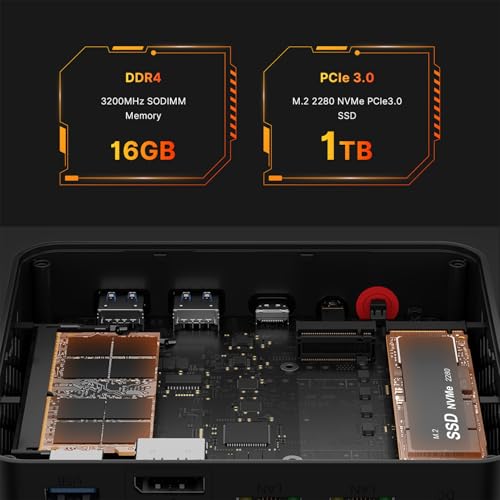
Pre-installed with 16GB DDR4 3200MHz SODIMM memory in a single-channel configuration, which supports manual upgrades up to 64GB (dual-channel capable upon upgrade via 2x SODIMM slots). [cite: 4] Storage is handled by a lightning-fast 1TB M.2 2280 NVMe PCIe 3.0 x4 solid-state drive. [cite: 5] To prevent storage bottlenecks and accommodate large media files, the motherboard houses an additional empty M.2 2280 NVMe PCIe 3.0 x4 slot, enabling dual-drive expansion up to 16TB total capacity. [cite: 6]
-
True Triple 4K@60Hz Visual Workspace:
Integrated AMD Radeon Graphics (running at a max frequency of 2000MHz) easily handle photo editing and smooth 4K decoding. [cite: 6] Equipped with 1x HDMI 2.0 port, 1x DisplayPort (DP), and 1x Full-Function Type-C port, the P4 Ultra can output to three independent 4K@60Hz monitors. [cite: 7] This multi-display configuration eliminates constant window-switching for stock traders, programmers, and office professionals. [cite: 8]
-
Dual 2.5G Enterprise Network Ports:
Unlike standard mini computers limited to a single Gigabit port, the BOSGAME P4 Ultra features two 2.5 Gigabit Ethernet ports (Realtek RTL8125 controller). [cite: 8] This hardware setup delivers up to 2500Mbps wired data transmission speeds, making it an exceptional bare-metal platform for soft routers, firewalls (such as pfSense or Untangle), private NAS cloud storage, or high-speed home servers. [cite: 9]
-
Full-Function Type-C Interface:
The Type-C port is fully engineered for multi-protocol data and display. [cite: 9] It supports high-speed data transfer and DisplayPort 4K video output. [cite: 10, 11]
Thermal & Noise Optimization
-
Advanced Quiet Cooling Fan:
A common issue with high-performance 8-core PCs is high-pitched fan noise under load. [cite: 11] The BOSGAME P4 Ultra resolves this with an upgraded large-diameter silent cooling fan combined with high-thermal-conductivity copper heat pipes. [cite: 12] Under routine office workloads or 4K video playback, the fan operates at whisper-quiet levels, ensuring a completely silent work environment. [cite: 13] Even under intensive multi-tasking stress loads, noise levels are strictly controlled to prevent audible distractions. [cite: 14]
-
Heavy-Duty Heat Dissipation Layout:
To eliminate performance drops caused by overheating, the internal structure features a specialized air circulation path. [cite: 14] Heat from the powerful Ryzen 7 CPU and the dual NVMe solid-state drives is rapidly drawn out through the ventilation mesh. [cite: 15] This prevents internal heat accumulation and guards against thermal throttling, ensuring the mini PC operates stably at optimal temperatures during long hours of continuous operation. [cite: 16]
Usage Scenarios & Q&A
Q1: Is this mini PC suitable for Business & Office Work?
A: Yes. Streamline Your Business and Office Work: Maximize your daily productivity and reclaim your space with a modern minimalist office setup. [cite: 17] Whether you are running heavy management software, analyzing spreadsheets, or doing extensive web browsing with dozens of tabs open, the Ryzen 7 7730U delivers smooth performance. [cite: 18] Seamlessly connect triple monitors via HDMI, DP, and Type-C to expand your workspace, keeping all your essential business applications in clear view without switching windows. [cite: 19]Q2: Can I use this micro PC as a Home Server for the Family?
A: Yes. A Reliable Home Server for the Family: Transform this micro PC into a dedicated high-speed home server. [cite: 21] Engineered with hardware-level Dual 2.5G Ethernet ports, it easily integrates into your home network or server rack to manage centralized family file storage, automated backups, and secure data sharing. [cite: 22] It runs quietly and is highly energy-efficient, making it a reliable 24/7 network hub for your household's digital life. [cite: 23]Q3: Is this computer capable of handling Photo Editing & Music Applications?
A: Yes. Unleash Creativity in Photo Editing and Music Applications: Designed for creators who need reliable processing power without the bulk. [cite: 24] The 8-core processor and up to 4TB of expandable NVMe storage provide a stable environment for photo editing. [cite: 25] It also delivers the performance required to smoothly run basic music production and home studio recording software. [cite: 26]Q4: Does this mini PC work well for Home Entertainment & TV Streaming?
A: Yes. Premium 4K Home Entertainment Center: Upgrade your living room experience with a powerful home entertainment hub. [cite: 27] Connect the P4 Ultra to your big screen for 4K TV streaming, movie nights, and casual gaming. [cite: 28] Backed by ultra-fast WiFi 6E and Bluetooth 5.2, it delivers smooth playback under stable network conditions for all your favorite media platforms, bringing cinematic visuals right to your couch. [cite: 29]Q5: Is it portable enough to take on Travel?
A: Yes. A Convenient Portable PC for Travel: Stay productive on the go. [cite: 31] Its ultra-compact form factor easily slips into your backpack, making it an essential tech companion for business travel. [cite: 32]Q6: Does the Type-C port on the BOSGAME P4 Ultra support Power Delivery (PD)?
A: The built-in Type-C port is designed for data and high-definition video output. Please always use the included DC power adapter to ensure stable operation and full performance. [cite: 35, 36]Q7: Can this mini computer be used as a Linux server or software router?
A: Yes. The BOSGAME P4 Ultra is fully compatible with Ubuntu Linux and specialized network operating systems. [cite: 37] Because it features dual 2.5G RJ45 LAN ports powered by the Realtek RTL8125 controller, it is perfectly optimized for running pfSense, OpnSense, Untangle, or Proxmox VE homelabs. [cite: 38]Q8: How do I expand the internal storage capacity?
A: The storage can be expanded in two ways. First, you can replace the pre-installed 1TB NVMe drive. Second, you can utilize the secondary, empty internal M.2 2280 NVMe PCIe 3.0 x4 slot to add an additional SSD without removing the original system drive. [cite: 39, 40]Q9: Is the operating system pre-activated and ready to use?
A: Yes. The BOSGAME P4 Ultra comes with a pre-installed, fully activated W-11 system. [cite: 42] The installation is perfectly clean, providing a fast and secure environment right out of the box. [cite: 43]
Questions & Answers
-
Q: What do I need to be aware of when using this mini PC for the first time?
A: To avoid initial setup issues, do not connect to the network or Wi-Fi until the Windows system is fully running. -
Q: How do I enter BIOS?
A: Press "Delete" continuously immediately after booting to enter BIOS settings; press "F7" to enter the boot options menu. -
Q: How do I switch the audio playback device in Windows?
A: If your Windows Mini PC is connected to multiple audio devices (e.g., speakers, headphones, webcams with microphones, or Bluetooth headsets), you will need to select the desired output device in your Windows sound settings. -
Q: Can I take the mini computer to other countries for use?
A: Yes, this BOSGAME Mini PC supports 100-240V; you can use it with a standard power plug converter. -
Q: Does the BOSGAME Mini PC have a built-in system?
A: Yes, the mini computer comes with a pre-installed universal system that meets the needs of over 99% of users. If you require other systems (e.g., Linux), you may install them yourself after receiving the unit. -
Q: What's in the box?
A: 1 x Mini PC, 1 x HDMI Cable, 1 x Power Adapter, 1 x User Manual.
After-sales Solutions
-
Q: What should I do if the machine cannot enter sleep mode?
- Disable Fast Startup: Go to Control Panel > Power Options > "Choose what the power buttons do." Uncheck "Turn on fast startup" and save changes.
- Restore Power Plans: In Control Panel (View by "Large icons"), go to Power Options. Find your current plan, click "Change plan settings," then click "Restore default settings for this plan."
- Turn Off Hybrid Sleep: In Power Options > "Change advanced power settings," locate "Sleep" and expand the menu. Set "Allow hybrid sleep" to "Off" for both "On battery" and "Plugged in."
-
Q: When I turn on the PC, it asks for a "defaultuser0" password.
Press Windows Key + R, type "netplwiz", and press Enter.
Alternatively, press SHIFT+F10 at the setup screen, type OOBE\BYPASSNRO, and the PC will reboot. When asked about the network, choose "I don't have internet" to create a local account.
-
Q: How do I deal with a Blue Screen of Death (BSOD)?
- CMOS Reset: Unplug all cables, insert a pin into the CMOS reset hole for 10+ seconds, then reconnect and restart.
- Hardware Check: Remove the SSD and RAM, clean the RAM contacts with an eraser, and reseat them firmly. Check BIOS to see if the SSD is detected.
- System Reinstall: If the above fails, please attempt a fresh system installation.
-
Q: How do I solve noisy fans or high temperatures?
- BIOS Update: Press "Delete" during boot to enter BIOS. Send us a photo of the Main page so we can check if a BIOS update is available.
- Settings: Adjust fan speed or VRAM settings in the BIOS.
- Turbo Boost: Turn off turbo boost in BIOS if necessary.
- Power Management: Go to Control Panel > Power Options > High Performance > Change plan settings > Advanced settings > Processor power management. Change "Maximum processor state" from 100% to 99% and click Save.
- Maintenance: Carefully remove the fan, clean it, and apply a small amount of non-conductive lubricant to the shaft.
Sold by
Amazon Warehouse
Official Amazon outlet for open-box & returned items
- Backed by Amazon's A-to-Z Guarantee
- 30-day return policy
- Ships from Amazon fulfillment centers
- Price verified on Amazon
Product Details
- SKU:
- awhd-us-b0gch917sw
- Model:
- P4 Ultra
- Country:
- US
- ASIN:
- B0GCH917SW
Shopping Smarter
Common questions about buying open-box and refurbished.
Why buy refurbished or open-box?
What's the difference between open-box and refurbished?
Why use OpenBoxFox?
Is it safe to buy refurbished?
More open-box deals
Updated daily from Amazon, Reebelo, and Dyson.


