Add to favorites


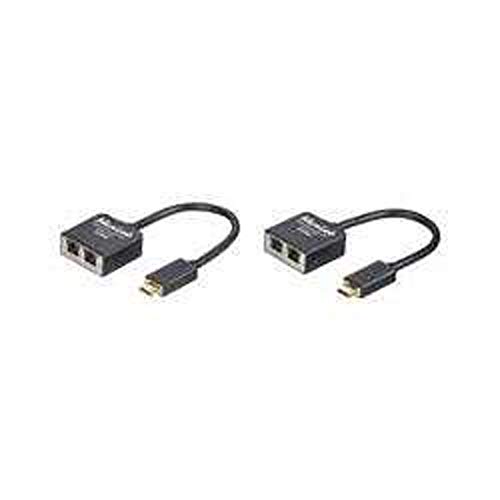
BKFK HDMI EDID Emulator, Passthrough Display Adapter, Default Resolution Dummy Plug, Headless Ghost for HDMI Switches, Extenders, AV Receivers, Video Splitters (1920X1080@60Hz-1P) — Open-Box, 44% Off
Brand: BKFK
Condition: Used - Mint
$899
$1599
-44% Save $700
Updated: 19 days ago
Description
EDID Emulation and Signal Stability--HDMI EDID Emulator Adapter simulates the EDID of a display, ensuring that even when no display device is connected, the source device (such as a DVD player, gaming console, or PC) can still output a signal.ures that regardless of whether the display is on or off, the source device continues to output stable video and audio signals, preventing signal loss or display errors.
Multi-Device Compatibility--This device is especially suitable for environments with multiple displays or devices, such as home theater systems, AV receivers, and video splitters. It resolves compatibility issues caused by mismatched EDID information between devices, ensuring that each device can correctly recognize and receive signals from the source device, thus avoiding image errors or connection failures due to device differences.
High Resolution and Audio Support--HDMI EDID Emulator supports high resolutions and various audio formats. It simulates the EDID information required by displays, including resolution, refresh rate, color depth, and audio settings. This ensures that the signals output by the source device match the capabilities of the display, delivering optimal picture and sound quality.
Plug and Play with Easy Setup--The installation of this device is straightforward, with no additional software or drivers required. Users simply connect the HDMI EDID Emulator between the source device and the display, and it will work automatically. Its plug-and-play design makes it ideal for home users as well as business environments that require quick deployment.
Wide Application Scenarios--HDMI EDID Emulator is versatile and can be used in various scenarios, Home Theater: Ensures signal stability between multiple devices, preventing display issues.Conference Rooms and Control Rooms: Provides seamless video transmission in multi-display setups.Commercial Displays and Digital Signage: Ensures consistent image and video output across multiple displays.AV Receivers and Video Splitters: Resolves compatibility issues in complex AV systems.
What is a BKFK HDMI EDID Emulator?
A BKFK HDMI EDID Emulator is a device used in HDMI signal transmission, designed to address compatibility issues between HDMI signal source devices (such as DVD players, gaming consoles, PCs, etc.) and display devices (such as TVs, projectors, monitors, etc.). Its primary function is to simulate the EDID (Extended Display Identification Data) of a display, ensuring that the source device always detects a connected display and outputs the correct video and audio signal.
1、 Main Functions and Working Principles of BKFK HDMI EDID Emulator
Simulate the EDID Information of a Display
-EDID is a standardized data format that contains basic information about a display device, such as supported resolutions, refresh rates, color depth, and audio formats.
-The core function of the BKFK HDMI EDID Emulator is to simulate the EDID information of a display. Even when no display is physically connected, it provides virtual EDID data to the HDMI source device (such as DVD players, PCs, or gaming consoles).
-When no display is connected, the source device may fail to detect EDID information, resulting in incorrect signal output or display errors. The BKFK HDMI EDID Emulator prevents this issue by maintaining stable video and audio signal transmission.
2. Solve Compatibility Issues Between Source and Display Devices
-By simulating accurate EDID data, the BKFK HDMI EDID Emulator helps source devices adapt to different display capabilities. This is especially useful for older displays or displays that do not support certain resolutions or refresh rates.
-It ensures the source device outputs signals with proper parameters, avoiding issues such as resolution mismatch, blurry images, unsupported formats, or connection failures.
3. Maintain Signal Stability
-In complex audio-visual systems, especially those involving multiple display devices, the BKFK HDMI EDID Emulator prevents signal loss caused by displays being powered off or disconnected.
-The source device does not need to continuously re-read EDID information and can maintain uninterrupted signal output using the simulated EDID.
4. Prevent Device Auto-Switching
-Some HDMI devices, such as AV receivers, HDMI switchers, or splitters, automatically adjust output signals based on detected EDID information.
-The BKFK HDMI EDID Emulator provides stable and correct EDID data, preventing unnecessary input switching, signal drops, or incorrect signal processing.
5. Support High Resolution and Deep Color Formats
-For displays that support high resolutions and deep color formats, the BKFK HDMI EDID Emulator can simulate EDID data compatible with these specifications.
-For example, it can simulate 4K resolution and high refresh rates, ensuring clear, stable, and high-quality image transmission.
Typical Application Scenarios
1. Home Theater Systems
In home theater systems with multiple HDMI devices (AV receivers, Blu-ray players, gaming consoles, TVs, projectors), the BKFK HDMI EDID Emulator ensures stable signal transmission even when displays are turned off or disconnected.
2. Multi-Display Environments
-In control rooms, conference rooms, or studios, a single source may need to output to multiple displays.
-The BKFK HDMI EDID Emulator ensures stable output to all displays, even if some monitors are powered off.
3. Video Distributors and Switchers
When using HDMI splitters or switchers, the BKFK HDMI EDID Emulator ensures valid EDID data is always available, preventing inconsistent outputs or signal loss.
4. AV Receivers and Audio Systems
The BKFK HDMI EDID Emulator ensures compatibility between AV receivers and connected audio/video devices, supporting correct audio formats and video resolutions.
5. Commercial Display and Digital Signage Systems
In shopping malls, museums, exhibition halls, and other commercial display environments, the BKFK HDMI EDID Emulator maintains stable signal output even when some displays are not connected or powered on.
6. Compatibility with Older Devices
The BKFK HDMI EDID Emulator can simulate EDID data for lower resolutions such as 1080p or 720p, ensuring compatibility between modern HDMI source devices and older display equipment.
1920 x1080@60Hz(Default Resolution)
1680 x1050@60Hz
1600 x1200@60Hz
1600 x1024@60Hz
1600 x900@60Hz
1440 x1080@60Hz
1440x900@60Hz
1366 x768@60Hz
1360 x768@60Hz
1280 x1024@60Hz
1280 x960@60Hz
1280 x800@60Hz
1280 x768@60/75Hz
1280x720@60/75Hz
1176 x664@60/75Hz
1152 x864@60/75Hz
1024x768@60/75Hz
800x600@60/75Hz
A BKFK HDMI EDID Emulator is a device used in HDMI signal transmission, designed to address compatibility issues between HDMI signal source devices (such as DVD players, gaming consoles, PCs, etc.) and display devices (such as TVs, projectors, monitors, etc.). Its primary function is to simulate the EDID (Extended Display Identification Data) of a display, ensuring that the source device always detects a connected display and outputs the correct video and audio signal.
1、 Main Functions and Working Principles of BKFK HDMI EDID Emulator
Simulate the EDID Information of a Display
-EDID is a standardized data format that contains basic information about a display device, such as supported resolutions, refresh rates, color depth, and audio formats.
-The core function of the BKFK HDMI EDID Emulator is to simulate the EDID information of a display. Even when no display is physically connected, it provides virtual EDID data to the HDMI source device (such as DVD players, PCs, or gaming consoles).
-When no display is connected, the source device may fail to detect EDID information, resulting in incorrect signal output or display errors. The BKFK HDMI EDID Emulator prevents this issue by maintaining stable video and audio signal transmission.
2. Solve Compatibility Issues Between Source and Display Devices
-By simulating accurate EDID data, the BKFK HDMI EDID Emulator helps source devices adapt to different display capabilities. This is especially useful for older displays or displays that do not support certain resolutions or refresh rates.
-It ensures the source device outputs signals with proper parameters, avoiding issues such as resolution mismatch, blurry images, unsupported formats, or connection failures.
3. Maintain Signal Stability
-In complex audio-visual systems, especially those involving multiple display devices, the BKFK HDMI EDID Emulator prevents signal loss caused by displays being powered off or disconnected.
-The source device does not need to continuously re-read EDID information and can maintain uninterrupted signal output using the simulated EDID.
4. Prevent Device Auto-Switching
-Some HDMI devices, such as AV receivers, HDMI switchers, or splitters, automatically adjust output signals based on detected EDID information.
-The BKFK HDMI EDID Emulator provides stable and correct EDID data, preventing unnecessary input switching, signal drops, or incorrect signal processing.
5. Support High Resolution and Deep Color Formats
-For displays that support high resolutions and deep color formats, the BKFK HDMI EDID Emulator can simulate EDID data compatible with these specifications.
-For example, it can simulate 4K resolution and high refresh rates, ensuring clear, stable, and high-quality image transmission.
Typical Application Scenarios
1. Home Theater Systems
In home theater systems with multiple HDMI devices (AV receivers, Blu-ray players, gaming consoles, TVs, projectors), the BKFK HDMI EDID Emulator ensures stable signal transmission even when displays are turned off or disconnected.
2. Multi-Display Environments
-In control rooms, conference rooms, or studios, a single source may need to output to multiple displays.
-The BKFK HDMI EDID Emulator ensures stable output to all displays, even if some monitors are powered off.
3. Video Distributors and Switchers
When using HDMI splitters or switchers, the BKFK HDMI EDID Emulator ensures valid EDID data is always available, preventing inconsistent outputs or signal loss.
4. AV Receivers and Audio Systems
The BKFK HDMI EDID Emulator ensures compatibility between AV receivers and connected audio/video devices, supporting correct audio formats and video resolutions.
5. Commercial Display and Digital Signage Systems
In shopping malls, museums, exhibition halls, and other commercial display environments, the BKFK HDMI EDID Emulator maintains stable signal output even when some displays are not connected or powered on.
6. Compatibility with Older Devices
The BKFK HDMI EDID Emulator can simulate EDID data for lower resolutions such as 1080p or 720p, ensuring compatibility between modern HDMI source devices and older display equipment.
1680 x1050@60Hz
1600 x1200@60Hz
1600 x1024@60Hz
1600 x900@60Hz
1440 x1080@60Hz
1440x900@60Hz
1366 x768@60Hz
1360 x768@60Hz
1280 x1024@60Hz
1280 x960@60Hz
1280 x800@60Hz
1280 x768@60/75Hz
1280x720@60/75Hz
1176 x664@60/75Hz
1152 x864@60/75Hz
1024x768@60/75Hz
800x600@60/75Hz
Sold by
Amazon Warehouse
Official Amazon outlet for open-box & returned items
- Backed by Amazon's A-to-Z Guarantee
- 30-day return policy
- Ships from Amazon fulfillment centers
- Price verified on Amazon
Product Details
- SKU:
- awhd-us-b0ghz2kkp3
- Model:
- 1920X1080@60Hz-1P
- Country:
- US
- ASIN:
- B0GHZ2KKP3
- UPC:
- 796926680630
Shopping Smarter
Common questions about buying open-box and refurbished.
Why buy refurbished or open-box?
Refurbished and open-box products offer the same performance as new at a fraction of the price. You're already saving $7 on this listing. They've been inspected, tested, and are ready to use — the only difference is the price tag. Buying refurbished also reduces electronic waste, extending product life cycles and keeping functional devices out of landfills.
What's the difference between open-box and refurbished?
Open-box products are customer returns that have been inspected and confirmed functional. They may show little to no use — often the item was returned simply because the buyer changed their mind. Refurbished products have been professionally repaired or restored by technicians, tested to meet or exceed manufacturer specifications, and sometimes come with a warranty. Both are a smart alternative to buying new.
Why use OpenBoxFox?
Finding refurbished deals is time-consuming — you'd have to check Amazon Warehouse, Reebelo, Dyson Outlet, and others separately for BKFK products. OpenBoxFox aggregates these listings in one place, so you can compare and find the best deal without the legwork. We update pricing daily so you always see current availability and real savings.
Is it safe to buy refurbished?
Yes. Products listed on OpenBoxFox come from established retailers like Amazon, Reebelo, and Dyson — not unknown third-party sellers. Each retailer has buyer protection policies, return windows, and in some cases warranties. You get the price advantage of used goods with the purchase security of a known retailer.