Add to favorites


2 Laptops 3 Monitors KVM Switch 2 Port MST Dual USB-C Docking KVM Switches Triple Monitor Support Max 10Gbps USB Transfer Dual 4K@60Hz & One 1080P@60Hz Video Output, 100W PD Charging — Open-Box, 48% Off
Brand: DXchip
Condition: Used - VeryGood
$7631
$14599
-48% Save $6968
Updated: 13 days ago
Description
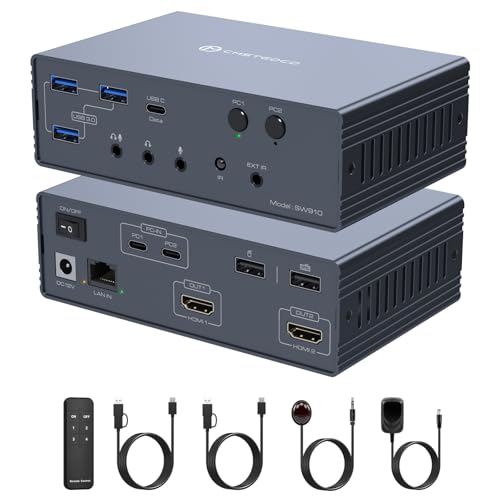
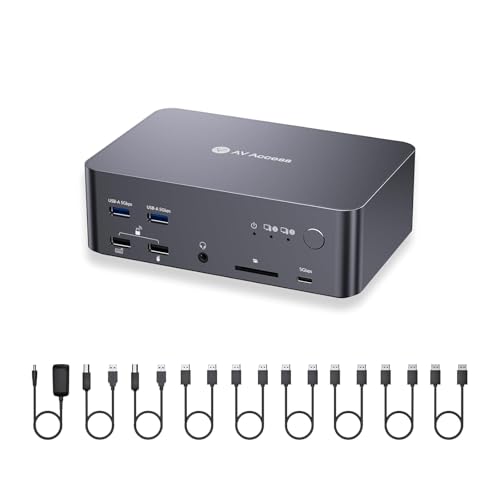
【2 Laptops 3 Monitors USB-C Docking KVM Switch】 The 3 monitors 2 laptops MST dual USB-C docking KVM switch acts as a powerful USB-C docking station and a 3 monitors 2 computers KVM switches! While expanding your USB-C laptop into three external monitors (2* HDMI & 1*DP) and 4 USB3.0 Hubs, it also allows you to easily switch between 2 laptops to share 3 monitors and four 10Gbps USB peripherals. Save money, simplify your setup, and boost productivity with a clean, organized workspace
【MST Dual 4K@60Hz & One 1080P@60Hz Output】The triple monitor 2 laptops KVM switch supports up to dual 4K@60Hz & one 1080P@60Hz outputs, effortlessly extending a single monitor to three external screens. Just plug and play, no any driver or software required. Switch between personal and work laptops with a single button press for seamless, hassle-free operation. 𝙉𝙤𝙩𝙚: The final output resolution depends on the capabilities of the laptops, monitors, and cables.
【SuperSpeed 10Gbps Stable Data Transfer】The MST 2 port USB Type C 2 computers kvm switch docking has 4 USB 3.1 Gen2 ports for connecting keyboard, mouse, printer, external hard drives, USB flash drives, and more. High performance USB 3.1 Gen2 chip supports blazing-fast transfer rate of 10Gbps, providing superior speed and stability than USB3.0. 𝙉𝙤𝙩𝙚: For more stable operation, please plug the included 12V/1A power adapter into DC/12V port
【Support 100W PD Fast Charging for Laptops】The 3 monitors KVM switch for 2 laptops features 100W power delivery(PD) port, just plug a 100W laptop charger from socket to the relevant PD port, which can keep your laptop charged while you work or play. Say good bye to the the hassle of having limited USB-C ports on your laptop. 𝙉𝙤𝙩𝙚: 100W actually powers the laptop at 73~80W, because both device and lines will consume power
【Wide Compatibility & Flexible Switching Ways】The 2 laptops 3 monitors Type-C docking KVM switch works smoothly with Windows, macOS, Linux, and Chrome OS. The switching method is very flexible, you can easily switch the signal between the 2 laptops in seconds through the Panel Button & Wired Remote Controller, clear LED indicators show the active computer
【Important Note – Read Before Purchase / Use】(𝟭) To get 3 screens output from laptops and make USB peripheral devices work properly, please ensure the USB-C port of the laptop supports DP Alt function(Video&Data&PD Transfer) and multiple-screen outputs; The CPU generation of laptop should be 11th or above; (𝟮) To avoid flickering or black screen, please use standard USB-C 3.1 Gen 2 cable within 1M; The length of DP and HDMI cables should be within 1.5M; (𝟯) For Mac Os, the 3 monitors only support displaying the same screen(Mirror or Extend ONE different screen from MAC), because MAC M1/M2 doesn’t support MST (multi-stream transport)
2 laptops 3 monitors docking triple monitor KVM switch for one personal laptop and one work laptop share 3 monitors and 4 USB 3.1 Gen2 peripherals
The 3 monitors 2 computers 2 laptops docking KVM switch is mainly designed to connect 2 laptops to three high-definition monitors and four USB 3.1 Gen2 devices, which can greatly elevate your multitasking capabilities. The 3 monitors 2 port MST USB-C docking kvm switch is ideal for designers, streamers, educators and those who want to manage multiple tasks with just a single click.
Features:
Combines the functionality of a USB-C docking station and a 3-monitor 2-computer KVM switch, Not only expand USB-C laptop with three external video outputs, one PD 100W charging port and 4* 10Gbps Hubs, but also allows to one-click switching between work laptop and personal laptop to share 3 monitors and 4 USB peripherals
Plug and play, no driver or software needed
Support up to dual 4K@60Hz and one 1080P@60Hz output , effortlessly extending one laptop monitor to three external screens
Equipped with 4* 10Gbps port for connecting keyboard, mouse, USB camera, U-Disk,scanner and other USB devices; Data transfer rate is up to 10Gbps, more stable and faster than USB 3.0 version
Support fast PD 100W charging for laptop while using the USB-C docking KVM switch
Equipped with DC 12V/1A power supply for high power USB devices
Supports two display modes: Duplicate and Extend mode
Cross support major operation systems including Windows, Mac and more
Come with a 1.5M wired remote controller, easy to switch signal.
Warm Tips:
(1)To get 3 screens output from laptop/desktop and make USB peripheral devices work properly, please ensure the USB-C port of the laptop supports DP Alt function(Video&Data&PD Transfer)
(2)For general laptops or computers, this 3 monitors KVM supports two display modes: Duplicate and Extend. However, for Mac OS, the 3 monitors only support displaying the same screen(Mirror or Extend ONE different screen from MAC, because MAC M1/M2 doesn’t support MST (multi-stream transport)
(3)When you connect some high power USB devices, please plug the included DC 12V/1A power cable to make the 2 laptops USB-C kvm switch work with more stable performance
(4)To avoid the flickering or black screen, please use standard USB-C 3.1 gen 2 cable within 1M to connect the USB-C laptop and USB-C docking station
Connect Steps:
Step 1. Connect one USB-C 3.1 Gen 2 cable between the first USB-C laptop and USB type-c docking station.
Step 2. Plug original laptop power cable from socket into the “PC1--PD” port on the 3 monitors KVM switch.
Step 3. Connect one USB-C 3.1 Gen 2 cable between the second USB-C laptop and USB type-c docking station (USB-C IN).
Step 4. Plug original laptop power cable from socket into the “PC2--PD” port on the 3 monitors KVM switch. Step 5. Connect 3 monitors to the relevant ports on the 3 monitors 2 laptops KVM (OUT A, OUT B, OUT C)
Step 5. Connect the keyboard,mouse and other USB devices to the four 10Gbps ports on the KVM.
Step 6. Insert the wired remote to remotely switch between 2 computers.
Step 7: Plug the included DC 12V/1A power cable to supply external power for the USB-C docking 2 computers 3 monitors KVM
The 3 monitors 2 computers 2 laptops docking KVM switch is mainly designed to connect 2 laptops to three high-definition monitors and four USB 3.1 Gen2 devices, which can greatly elevate your multitasking capabilities. The 3 monitors 2 port MST USB-C docking kvm switch is ideal for designers, streamers, educators and those who want to manage multiple tasks with just a single click.
Features:
Combines the functionality of a USB-C docking station and a 3-monitor 2-computer KVM switch, Not only expand USB-C laptop with three external video outputs, one PD 100W charging port and 4* 10Gbps Hubs, but also allows to one-click switching between work laptop and personal laptop to share 3 monitors and 4 USB peripherals
Plug and play, no driver or software needed
Support up to dual 4K@60Hz and one 1080P@60Hz output , effortlessly extending one laptop monitor to three external screens
Equipped with 4* 10Gbps port for connecting keyboard, mouse, USB camera, U-Disk,scanner and other USB devices; Data transfer rate is up to 10Gbps, more stable and faster than USB 3.0 version
Support fast PD 100W charging for laptop while using the USB-C docking KVM switch
Equipped with DC 12V/1A power supply for high power USB devices
Supports two display modes: Duplicate and Extend mode
Cross support major operation systems including Windows, Mac and more
Come with a 1.5M wired remote controller, easy to switch signal.
Warm Tips:
(1)To get 3 screens output from laptop/desktop and make USB peripheral devices work properly, please ensure the USB-C port of the laptop supports DP Alt function(Video&Data&PD Transfer)
(2)For general laptops or computers, this 3 monitors KVM supports two display modes: Duplicate and Extend. However, for Mac OS, the 3 monitors only support displaying the same screen(Mirror or Extend ONE different screen from MAC, because MAC M1/M2 doesn’t support MST (multi-stream transport)
(3)When you connect some high power USB devices, please plug the included DC 12V/1A power cable to make the 2 laptops USB-C kvm switch work with more stable performance
(4)To avoid the flickering or black screen, please use standard USB-C 3.1 gen 2 cable within 1M to connect the USB-C laptop and USB-C docking station
Connect Steps:
Step 1. Connect one USB-C 3.1 Gen 2 cable between the first USB-C laptop and USB type-c docking station.
Step 2. Plug original laptop power cable from socket into the “PC1--PD” port on the 3 monitors KVM switch.
Step 3. Connect one USB-C 3.1 Gen 2 cable between the second USB-C laptop and USB type-c docking station (USB-C IN).
Step 4. Plug original laptop power cable from socket into the “PC2--PD” port on the 3 monitors KVM switch. Step 5. Connect 3 monitors to the relevant ports on the 3 monitors 2 laptops KVM (OUT A, OUT B, OUT C)
Step 5. Connect the keyboard,mouse and other USB devices to the four 10Gbps ports on the KVM.
Step 6. Insert the wired remote to remotely switch between 2 computers.
Step 7: Plug the included DC 12V/1A power cable to supply external power for the USB-C docking 2 computers 3 monitors KVM
Sold by
Amazon Warehouse
Official Amazon outlet for open-box & returned items
- Backed by Amazon's A-to-Z Guarantee
- 30-day return policy
- Ships from Amazon fulfillment centers
- Price verified on Amazon
Product Details
- SKU:
- awhd-us-b0g5pjstkk
- Model:
- KVMC213DH2
- Country:
- US
- ASIN:
- B0G5PJSTKK
- UPC:
- 741029335543
Shopping Smarter
Common questions about buying open-box and refurbished.
Why buy refurbished or open-box?
Refurbished and open-box products offer the same performance as new at a fraction of the price. You're already saving $70 on this listing. They've been inspected, tested, and are ready to use — the only difference is the price tag. Buying refurbished also reduces electronic waste, extending product life cycles and keeping functional devices out of landfills.
What's the difference between open-box and refurbished?
Open-box products are customer returns that have been inspected and confirmed functional. They may show little to no use — often the item was returned simply because the buyer changed their mind. Refurbished products have been professionally repaired or restored by technicians, tested to meet or exceed manufacturer specifications, and sometimes come with a warranty. Both are a smart alternative to buying new.
Why use OpenBoxFox?
Finding refurbished deals is time-consuming — you'd have to check Amazon Warehouse, Reebelo, Dyson Outlet, and others separately for DXchip products. OpenBoxFox aggregates these listings in one place, so you can compare and find the best deal without the legwork. We update pricing daily so you always see current availability and real savings.
Is it safe to buy refurbished?
Yes. Products listed on OpenBoxFox come from established retailers like Amazon, Reebelo, and Dyson — not unknown third-party sellers. Each retailer has buyer protection policies, return windows, and in some cases warranties. You get the price advantage of used goods with the purchase security of a known retailer.