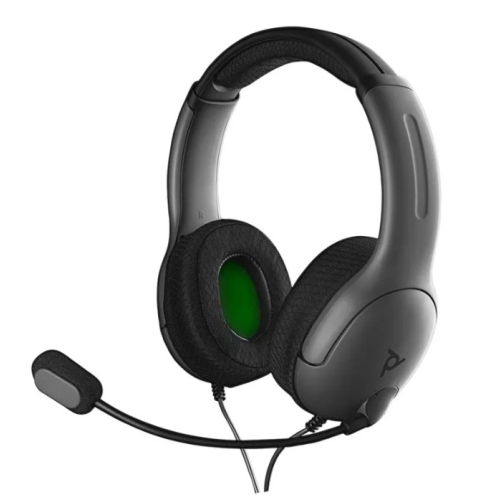
Stereo Gaming Headset for Xbox Series X|S -PDP LVL40 Wired - Black — Open-Box, 50% Off
Brand: PDP GAMING
Description
t’s time to level up your headset with the PDP Gaming LVL40 Wired Stereo Gaming Headset for Xbox!
The lightweight build offers long-lasting comfort whether you’re spending the day in co-op missions, or just playing a quick match. Hear your enemies before you see them with the two powerful 40mm speaker drivers. The LVL40 Wired Stereo Gaming Headset is also compatible with Windows Sonic so you can enjoy spatial sound. Give your team clear commands through the flexible, noise-canceling microphone, or flip it up to instantly mute it.
Keep your eyes on the game and make quick audio adjustments with the on-ear volume control, while the breathable ear cushions help you stay cool and prevent fatigue. Stay a step ahead with the LVL40 Wired Stereo Gaming Headset!
Compatible with Windows Sonic so you can enjoy spatial sound for gaming on Xbox Series X|S, Xbox One, and Windows 10 PCS.
Features
Comfortable, lightweight build for long gaming sessions
Immersive audio experience with powerful 40mm speaker drivers
Flexible, noise-canceling mic with the flip-to-mute feature
Compatible with Windows Sonic so you can enjoy spatial sound for gaming on Xbox Series X|S, Xbox One, and Windows 10 PCS
How can I set-up my LVL40 headset with my Xbox console?
Setting up the LVL40 headset with your Xbox is really easy to do. All you will have to do is follow the steps as seen below:
Check the base of your Xbox wireless controller to ensure your controller has a 3.5mm AUX port for audio. If it does not, you will need to use a separate Xbox headset adapter.
Insert the headset’s 3.5mm audio plug into the AUX port located at the controller’s base.
Check your audio settings to ensure your LVL50 headset is selected as the assigned
audio device.
Hit the “Menu” button on your Xbox controller to open the console menu >
select “Settings.” You can now adjust the Headset Volume, Headset Chat Mixer, and
Mic Monitoring.
Xbox - The mic is not working on my LVL40 headset, what can I do to get it working again?
First, make sure your controller has fresh batteries. The Xbox console is set up so the mic audio will turn off if your batteries are low in order to conserve power within the controller.
If your headset is connected direct to the controller via 3.5mm give the following a try:
Disconnect the headset from your controller
Fully power down your Xbox
Power on the Xbox
Sign into your profile
Connect the headset back to your controller.
Verify the headset itself is not muted.
On your Xbox one controller double tap the Xbox button
Scroll to the settings icon.
Make sure the setting Headset mic is set to on.
Adjust the game and chat mixer settings.
Product Details
- SKU:
- bbca-19840582
- Model:
- LVL40
- Country:
- CA
Shopping Smarter
Common questions about buying open-box and refurbished.
Why buy refurbished or open-box?
What's the difference between open-box and refurbished?
Why use OpenBoxFox?
Is it safe to buy refurbished?
More open-box deals
Updated daily from Amazon, Reebelo, and Dyson.