Add to favorites




External DVD Drive USB 3.0 Type-C CD Burner Portable CD/DVD Drive DVD Player for Laptop External CD Drive CD Reader Lecteur CD Externe for PC Laptop Desktop Windows 11/10/8.1/7 Linux OS Apple Mac — Open-Box, 8% Off
Brand: BENEWY
Condition: Used - VeryGood
$2391
$2599
-8% Save $208
Updated: 20 days ago
Description
Plug and Play: This Benewy External DVD Drive is is powered by USB port, just plug the USB A/USB C data cable into your computer, insert the CD/DVD, then the External DVD Drive automatically recognizes it, use the corresponding software to read and burn your CDs or DVDs. Easy to use
Wide Compatibility: CD Burner supports different devices such as PC, Laptop, Macbook, iMac, Notebook, Desktop etc. It's compatible with Windows 11/10/8.1/7/XP/2003/Vista,Linux,all version Mac OS system PC and Laptop.In addition,the CD Burner supports reading and writing of CD±R/RW,CD-ROM,DVD±R/RW, DVD-RAM,VCD,and SVCD. Not supported: Cars,TVs,Tablets,Smartphones,Projectors and Blu-ray disk ; Not support: m1 chip,m2 chip,m3 chip and m4 chip; Windows 11 requires media player
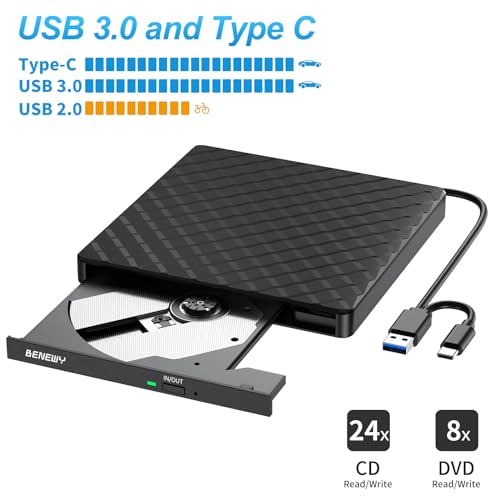
USB 3.0 High-Speed Data Transfer: External CD/DVD Drive for Laptop with high speed USB 3.0 technology and backward compatible with USB 2.0. USB 3.0 CD Burner brings you faster data transmission speed : up to a maximum of 5Gbps.The External CD Drive offers Max 8x DVD Write/Read Speed and Max 24x CD Write/Read speed, faster than you expected
Portable Design: This DVD Player for Laptop is very slim and lightweight and the embedded data cable is easy to use and organize, skip-proof rubber pad prevents sliding on the desktop, so this External CD & DVD Drives/DVD Burner/CD Reader can easily carry in your laptop bag ideal for home, office, or anywhere you go
Notice: 1.Making sure that your computer has a normal driver program, suitable media player and burn software before using this Lecteur CD/DVD Externe for PC to work; 2.For iOS system using the mac commands to eject the disc, ios system refuse to perform the command made by the drive
BENEWY External DVD Drive USB 3.0 Type-C CD Burner Portable CD DVD+/-RW Drive DVD Player for Laptop External CD Drive CD Reader Lecteur CD Externe for PC Laptop Desktop Windows 11/10/8.1/7 Linux OS Apple Mac
1: Ultra-thin, ultra-light, classic design, easy to carry and can be used on many laptop / desktop
2: Plug and play, external dvd drive is powered by USB port. No extra driver and power needed. Just hook up the external cd drive to the direct USB port on your computer and the DVD drive will be detected.
3: The dvd player for laptop has strong error correction, anti-skid and quiet capabilities.
4: USB 3.0 HIGH-SPEED DATA TRANSFER,External CD/DVD Drive for Laptop with USB 3.0 and Type-C dual interface. Backwards compatible with USB2.0 USB1.0, bringing you faster data transmission speed (up to a maximum of 5Gbps)
Specifications:
Interface: USB 3.0, Type-C (compatible with USB 2.0 and USB 1.0)
Support CD specifications: 8cm, 12cm
Supported CD/DVD formats: DVD-ROM, DVD-R, DVD + R, DVD-RW, DVD-R DL, CDA, CD-ROM, CD-R, VCD, SVCD, CD-RW
Reading speed: DVD-R, DVD + R 8X; DVD-RW 4X; CD-R 24x
Write speed: DVD-ROM 8x; CD-ROM 24x
Product dimensions: 14 x 14.2 x 1.8 cm
Weight: 250g
Package includes: 1x USB 3.0 and USB C external DVD drive 1x user manual
Some things to note about this cd burner
1.The external dvd drive should be connected with USB port on laptop rather than connect with USB HUB. In addition, please connect the item with USB port behind of computer host if you use a desktop.
2.Ensure CDs is placed well and not scratched. The raised fixing post in the middle of the CD drive tray has three spring buckles. You need to gently press the CD disc into the spring buckles to secure the disc.
3.Make sure your computer's CD/DVD driver is intact before using an external cd drive. The computer operating system comes with a CD/DVD driver. If the program is damaged or removed, the CD/DVD driver needs to be updated or reinstalled.
4.Once you plug this external dvd player for laptop into your computer, it will bring up your downloaded Media Player, select it, and from that point forward whatever disc you put in will automatically open through it. You download a Media Player program onto your computer if don't already have one before you hook it up.
5.Remember to set the DVD Region to United States on the player – Windows :This PC– dvd drive- Properties – Hardware Tab – Properties button – Choose Region (US is 1) -Apply. Mac:Menu-System Preference-Language & Region - Region - Select Country - Apply Remember you can only reset the country 5 times.
6.Mac OS computers do not display the device icon before placing a disc into disc tray & drive reads successfully the disc. For Mac OS, use the mac command to eject disc. If eject button/computer command not working, stick emergency hole to force eject a disc.
7.Computers often do not natively support DVD movie playing, so a third-party media player (such as VLC) must be downloaded and installed to watch DVDs using this CD/DVD player. You can download and install a playing/burning software you like. You can also refer to the following software:
No fee playing software: Any Media Player, Any DVD
No fee burning software for Windows OS: InfraRecorder, Ones, Express Disc Burner
No fee burning software for mac OS: Burn for mac
No fee burning software for Linux OS/Unix OS: K3b (KDE Burn Baby Burn)
8.Because the video formats of most computers and mobile phones are not compatible with DVD, you need third-party software to convert the file format to a format that can be displayed on the disc, otherwise, even if you burn the file to a disc, it will not work.
1: Ultra-thin, ultra-light, classic design, easy to carry and can be used on many laptop / desktop
2: Plug and play, external dvd drive is powered by USB port. No extra driver and power needed. Just hook up the external cd drive to the direct USB port on your computer and the DVD drive will be detected.
3: The dvd player for laptop has strong error correction, anti-skid and quiet capabilities.
4: USB 3.0 HIGH-SPEED DATA TRANSFER,External CD/DVD Drive for Laptop with USB 3.0 and Type-C dual interface. Backwards compatible with USB2.0 USB1.0, bringing you faster data transmission speed (up to a maximum of 5Gbps)
Specifications:
Interface: USB 3.0, Type-C (compatible with USB 2.0 and USB 1.0)
Support CD specifications: 8cm, 12cm
Supported CD/DVD formats: DVD-ROM, DVD-R, DVD + R, DVD-RW, DVD-R DL, CDA, CD-ROM, CD-R, VCD, SVCD, CD-RW
Reading speed: DVD-R, DVD + R 8X; DVD-RW 4X; CD-R 24x
Write speed: DVD-ROM 8x; CD-ROM 24x
Product dimensions: 14 x 14.2 x 1.8 cm
Weight: 250g
Package includes: 1x USB 3.0 and USB C external DVD drive 1x user manual
Some things to note about this cd burner
1.The external dvd drive should be connected with USB port on laptop rather than connect with USB HUB. In addition, please connect the item with USB port behind of computer host if you use a desktop.
2.Ensure CDs is placed well and not scratched. The raised fixing post in the middle of the CD drive tray has three spring buckles. You need to gently press the CD disc into the spring buckles to secure the disc.
3.Make sure your computer's CD/DVD driver is intact before using an external cd drive. The computer operating system comes with a CD/DVD driver. If the program is damaged or removed, the CD/DVD driver needs to be updated or reinstalled.
4.Once you plug this external dvd player for laptop into your computer, it will bring up your downloaded Media Player, select it, and from that point forward whatever disc you put in will automatically open through it. You download a Media Player program onto your computer if don't already have one before you hook it up.
5.Remember to set the DVD Region to United States on the player – Windows :This PC– dvd drive- Properties – Hardware Tab – Properties button – Choose Region (US is 1) -Apply. Mac:Menu-System Preference-Language & Region - Region - Select Country - Apply Remember you can only reset the country 5 times.
6.Mac OS computers do not display the device icon before placing a disc into disc tray & drive reads successfully the disc. For Mac OS, use the mac command to eject disc. If eject button/computer command not working, stick emergency hole to force eject a disc.
7.Computers often do not natively support DVD movie playing, so a third-party media player (such as VLC) must be downloaded and installed to watch DVDs using this CD/DVD player. You can download and install a playing/burning software you like. You can also refer to the following software:
No fee playing software: Any Media Player, Any DVD
No fee burning software for Windows OS: InfraRecorder, Ones, Express Disc Burner
No fee burning software for mac OS: Burn for mac
No fee burning software for Linux OS/Unix OS: K3b (KDE Burn Baby Burn)
8.Because the video formats of most computers and mobile phones are not compatible with DVD, you need third-party software to convert the file format to a format that can be displayed on the disc, otherwise, even if you burn the file to a disc, it will not work.
Sold by
Amazon Warehouse
Official Amazon outlet for open-box & returned items
- Backed by Amazon's A-to-Z Guarantee
- 30-day return policy
- Ships from Amazon fulfillment centers
- Price verified on Amazon
Product Details
- SKU:
- awhd-ca-b0b42c9y3v
- Model:
- SY879
- Country:
- CA
- ASIN:
- B0B42C9Y3V
Shopping Smarter
Common questions about buying open-box and refurbished.
Why buy refurbished or open-box?
Refurbished and open-box products offer the same performance as new at a fraction of the price. You're already saving $2 on this listing. They've been inspected, tested, and are ready to use — the only difference is the price tag. Buying refurbished also reduces electronic waste, extending product life cycles and keeping functional devices out of landfills.
What's the difference between open-box and refurbished?
Open-box products are customer returns that have been inspected and confirmed functional. They may show little to no use — often the item was returned simply because the buyer changed their mind. Refurbished products have been professionally repaired or restored by technicians, tested to meet or exceed manufacturer specifications, and sometimes come with a warranty. Both are a smart alternative to buying new.
Why use OpenBoxFox?
Finding refurbished deals is time-consuming — you'd have to check Amazon Warehouse, Reebelo, Dyson Outlet, and others separately for BENEWY products. OpenBoxFox aggregates these listings in one place, so you can compare and find the best deal without the legwork. We update pricing daily so you always see current availability and real savings.
Is it safe to buy refurbished?
Yes. Products listed on OpenBoxFox come from established retailers like Amazon, Reebelo, and Dyson — not unknown third-party sellers. Each retailer has buyer protection policies, return windows, and in some cases warranties. You get the price advantage of used goods with the purchase security of a known retailer.


